Why Brightlane needs an event log
This is the first lesson of the course. It answers one question: what problem does Kafka solve that a database doesn't? You'll answer it with Brightlane Charging, the company you work for throughout the course, and then watch it happen in the lab.
Theory
Example: the database that everyone asks
Brightlane Charging runs 240 public chargers for electric cars at 36 sites. Every charger talks to Brightlane's charger gateway, a service that stores each charging session in a PostgreSQL database.
Three teams need that data:
- Billing asks the database every minute: "which sessions ended since my last check?"
- The grid report asks every minute how much energy each site used. The national grid operator wants these numbers per 5-minute window.
- The driver app asks every 10 seconds which chargers are free, for its map.
On a weekday evening about 160 sessions run at once. At 17:45 the gateway database sits at 90% CPU, and most of that work is answering the same questions again and again. Last Tuesday billing missed three sessions: they ended in the same second as billing's previous check, and the "since my last check" query skipped them.
Then a fourth team arrives. Fleet sales wants every session from last week to build an offer for a taxi company. But the database keeps only each session's latest state. Nobody can say exactly what happened last week, in what order.
An event log
The fix is to stop asking the database "what is the state now?" and start recording what happened.
An event is a record of something that happened, written in the past tense and never changed afterwards. "Session ses-7f3a19 started on charger BL-N03-04 at 17:31" is an event. So is "it stopped at 18:09 after 31.4 kWh".
An event log is an ordered list of events. New events are only ever added at the end. Old events are kept for a set time, called retention (7 days by default in Kafka), and nobody edits them.
Apache Kafka is a system that stores event logs on several servers and lets many programs write and read them at the same time. In Kafka:
- a named event log is a topic, for example
charging.sessions; - a program that writes events to a topic is a producer (here, the charger gateway);
- a program that reads events from a topic is a consumer (billing, the grid report, the app).
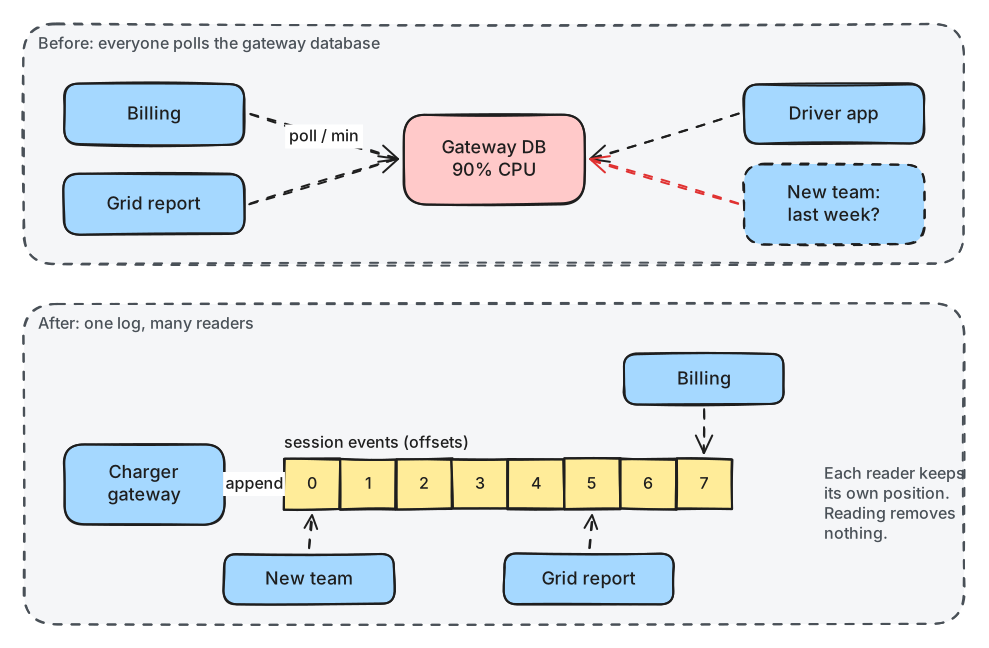
What to notice: in the lower half the database is gone from the picture, and each reader points at a different place in the same log.
The gateway now does one thing: it appends each event to the topic, once. It doesn't know or care who reads it. Billing can't miss an event because it doesn't search by time: it reads the next event after the last one it handled.
Many readers, one copy
Reading an event from a Kafka topic doesn't remove it. Each reader keeps its own position: a number that says how far into the log it has read. Kafka calls these numbers offsets: the first event in a log is offset 0, the next is 1, and so on. Lesson 1.3 looks at offsets closely.
Because positions are per reader, three things become easy:
- Independent speed. The app reads within milliseconds. Billing may fall behind at the peak and catch up later. Neither slows the other down, and neither slows the gateway.
- Replay. A reader can move its position back and read the same events again: after a bug fix, for example.
- Newcomers. Fleet sales starts at offset 0 and reads last week's history, as long as it is still within retention.
Kafka groups readers that work together under a shared name, the consumer group. Kafka remembers the position of each group. Module 3 covers groups in depth; for now, one group means one independent reader.
This is the difference from a queue, such as RabbitMQ or Amazon SQS. A queue hands each message to one receiver and deletes it once it has been handled. That's ideal for sharing out work, but a second team can't read the same messages later. (Kafka 4.2 added share groups, which give Kafka queue-like reading too. Lesson 3.4 shows them.)
When Kafka fits, and when it doesn't
Kafka is worth its cost when at least two of these are true:
- several independent teams or services need the same events;
- you need history: replaying, rebuilding a view, or starting a new reader from the past;
- the volume is more than one database should serve: thousands of events a second, around the clock.
Brightlane ticks all three. Kafka is the wrong tool when:
- one program sends a little data to one other program. A table or a simple queue is cheaper.
- the caller needs an answer now ("is this card valid?"). That's a request and a reply, so use an API call.
- you want to look things up by key ("the current status of BL-N03-04"). Kafka has no indexes for that. Keep a database or cache for it, fed from Kafka (lesson 4.3 shows how).
- you move files. A record is limited to about 1 MB by default. Put files in object storage and send an event with the link.
In production
Running Kafka means at least three servers, monitoring, upgrades and people who understand it. Managed services (Amazon MSK, Confluent Cloud, Aiven, Google Cloud's managed Kafka and others) take the servers off your hands but not the design decisions this course teaches. Lesson 9.3 compares the options.
Practical
Note
Notebook: code/module-01/01-why-brightlane-needs-an-event-log.ipynb
· Lab services: kafka-1, kafka-2, kafka-3 · Time: ~17 min (plus ~15 min for the one-time lab setup)
What you'll do: write five session events once, then let billing, the grid report and a team that "arrives next week" each read them independently. Then you'll see the most common reason a new consumer shows nothing.
The lab
The lab runs Kafka in Docker on your Mac. If you haven't set it up yet, follow the
lab setup once: it installs Python packages and explains the Docker
settings. Then start the lab from the code/ folder:
docker compose up -d --wait
Output (the last lines; it takes about 20 seconds the first time):
 ✔ Container kafka-hands-on-lab-kafka-1-1   Healthy
 ✔ Container kafka-hands-on-lab-kafka-2-1   Healthy
 ✔ Container kafka-hands-on-lab-kafka-3-1   Healthy
 ✔ Container kafka-hands-on-lab-kafka-ui-1  Healthy
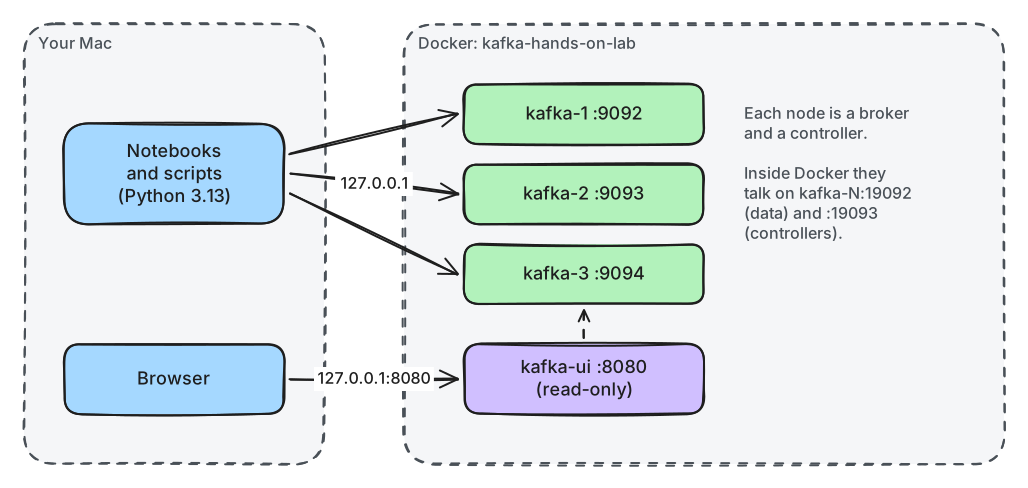
What to notice: your Python code runs on the Mac, outside Docker, and reaches each Kafka node on its own port: 9092, 9093 and 9094.
Open the notebook in JupyterLab (jupyter lab from the code/ folder) and run the setup cell.
It checks the lab and prints the versions:
Python           3.13.5
confluent-kafka  2.15.1  (librdkafka 2.15.1)
Kafka (brokers)  4.3.1
Step 1: Create the topic
A topic must exist before anyone writes to it. The lab is configured like production here: it doesn't create topics automatically when a client mentions a new name.
TOPIC = "m01l01-sessions"
admin = AdminClient({"bootstrap.servers": settings.KAFKA_BOOTSTRAP})
# ...
futures = admin.create_topics([NewTopic(TOPIC, num_partitions=1, replication_factor=3)])
futures[TOPIC].result()                                             # raises if creation failed
AdminClient is the client for managing topics. settings.KAFKA_BOOTSTRAP holds the brokers'
addresses (lesson 1.2 explains them). Ignore num_partitions and replication_factor for now.
created m01l01-sessions
Step 2: The gateway writes five events
producer = Producer({"bootstrap.servers": settings.KAFKA_BOOTSTRAP})
for charger_id, event in events:
    producer.produce(TOPIC, key=charger_id, value=to_json(event))
    print(f"{event['ts']}  {event['type']:<16} {event['session_id']}  {charger_id}")
print("not yet stored:", producer.flush(10))           # wait until Kafka has stored all of them
produce() only queues the event inside your program; the client sends queued events in the
background. flush() waits until Kafka has stored them all and returns how many are still
waiting.
Output (your dates show yesterday's date: the generator always replays yesterday evening's peak):
2026-10-05T17:30:07Z  session_started  ses-a5db25  BL-N02-03
2026-10-05T17:30:22Z  session_started  ses-53ca2d  BL-N14-02
2026-10-05T17:30:30Z  session_started  ses-fa7469  BL-C04-01
2026-10-05T17:30:30Z  session_started  ses-9f1ca9  BL-N13-06
2026-10-05T17:30:46Z  session_started  ses-b9d6df  BL-C01-04
not yet stored: 0
Step 3: Billing reads them
The notebook defines two small helpers. reader() creates a consumer in its own group:
def reader(group_id, start="earliest"):
    c = Consumer({"bootstrap.servers": settings.KAFKA_BOOTSTRAP, "group.id": group_id,
                  "auto.offset.reset": start})
    c.subscribe([TOPIC])
    return c
group.id names the reader. auto.offset.reset says where a group with no stored position
starts: earliest means at offset 0. read_available() calls consumer.poll() in a loop and
stops when no new event has arrived for 2 seconds.
billing = reader("m01l01-billing")
print("billing read:", [e["session_id"] for e in read_available(billing)])
billing read: ['ses-a5db25', 'ses-53ca2d', 'ses-fa7469', 'ses-9f1ca9', 'ses-b9d6df']
Step 4: The grid report reads the same events
grid = reader("m01l01-grid")
print("grid read:   ", [e["session_id"] for e in read_available(grid)])
grid read: ['ses-a5db25', 'ses-53ca2d', 'ses-fa7469', 'ses-9f1ca9', 'ses-b9d6df']
Billing's read removed nothing.
Step 5: Three more events arrive
The gateway writes three more events. Both readers poll again.
billing read: ['ses-13ad04', 'ses-a2481d', 'ses-79f44e']
grid read:    ['ses-13ad04', 'ses-a2481d', 'ses-79f44e']
Each reader continued from its own position and got only the new events.
Step 6: A team that starts next week
app = reader("m01l01-app")
history = read_available(app)
print(f"app read {len(history)} events, first {history[0]['ts']}, last {history[-1]['ts']}")
app read 8 events, first 2026-10-05T17:30:07Z, last 2026-10-05T17:30:59Z
The newcomer read the whole history without anyone resending it.
Break it: a newcomer that starts at "latest"
Predict first: a new group with auto.offset.reset=latest subscribes now. How many of the 8
stored events will it read?
latecomer = reader("m01l01-latecomer", start="latest")
print("latecomer read:", len(read_available(latecomer, max_wait=6)), "events")
latecomer read: 0 events
What just happened
The gateway wrote each event once, to the end of the topic: that's the event log. Billing, the
grid report and the app each kept their own position, so reading never removed anything and
nobody slowed anybody else down. That's "many readers, one copy". The app's group started at
offset 0 and replayed the full history, which is what fleet sales needed. The latecomer read
nothing because a new group with latest starts at the end of the log and waits for new events.
The Python client's default is latest, and it's the most common reason a new consumer "shows
nothing".
Clean up
The last cell closes the consumers, deletes the topic and deletes the four groups. If anything
gets stuck, run docker compose down -v in the code/ folder to reset the whole lab, then
docker compose up -d --wait again.
Key takeaways
- An event is a fact about the past; an event log keeps events in order and never edits them.
- In Kafka, producers append to topics; consumers read them, each group from its own position.
- Reading doesn't delete: many teams can read the same events, at their own speed, and replay them.
- New groups start at
latestby default. Setauto.offset.reset=earliestwhen you need history. - Use Kafka when several readers, history or volume make a database or a queue the wrong fit.