Consumer groups share the work
One consumer process can only do so much. When events arrive faster than it handles them, you run more copies, and Kafka splits the topic between them. This lesson shows how that split works, where it stops helping, and how to tell whether your consumers keep up.
Theory
Example: receipts 20 minutes late
Brightlane's billing service is one Python process. For every session event it calls the payment provider: a card pre-authorisation when a session starts, the final charge when it stops. Each call takes about 0.4 seconds, so the process handles about 2.5 events a second. Today that's plenty.
In the growth-plan load test (25 times today's traffic), the evening peak produced about 3.4 session events a second. Billing fell further behind every minute. By the end of the peak, drivers got their receipts 20 minutes after they unplugged. The fix looked obvious: run three copies. But three copies must split the events between them, not each charge every session.
The poll loop
A consumer is a client that reads records from topics. Its code is a loop: subscribe to topics once, then ask for records again and again. Each call returns whatever the client has fetched in the background, or nothing after a timeout.
consumer = Consumer({"bootstrap.servers": BOOTSTRAP, "group.id": "billing",
                     "auto.offset.reset": "earliest"})
consumer.subscribe(["charging.sessions"])
while True:
    for msg in consumer.consume(num_messages=50, timeout=0.5):   # up to 50 records, or none
        charge(msg)
The loop must keep calling consume() (or poll(), which returns one record). That's how the
client fetches more and shows the group it's still working. Lesson 3.3 shows what happens when it
stops.
Consumer groups
Every consumer has a group.id. Consumers with the same group id form a consumer group: they
share the work of reading a topic. Kafka gives each partition to exactly one member of the group,
so each record is handled by one member. One broker, the group's coordinator, keeps the list of
members and their partitions.
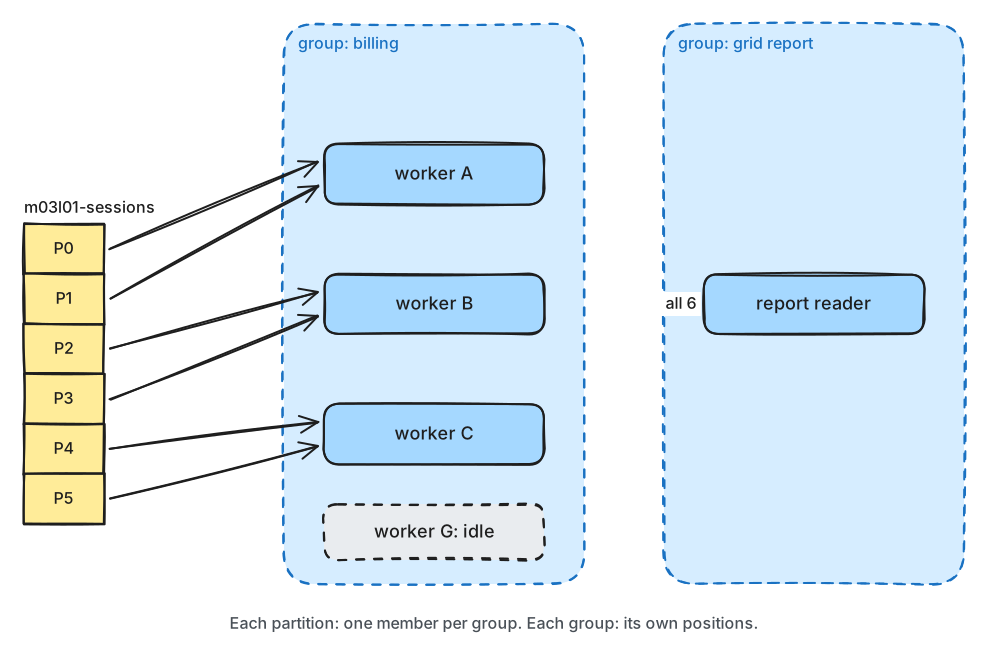
What to notice: within a group, a partition has one reader; across groups, every group reads everything.
Three rules follow from "one member per partition":
- Partitions cap a group's parallelism. A topic with six partitions keeps at most six members busy. A seventh member is a spare: it gets nothing until another member leaves.
- Order holds per partition. The member that owns a partition reads its records in order. Since a key always maps to one partition (lesson 2.1), all of one charger's events reach the same member.
- Groups are independent. Billing and grid reporting each read every record, at their own pace. Adding a group costs the brokers some reads; it doesn't take records away from anyone.
Each time a member joins or leaves, the group redistributes its partitions. That's a rebalance,
and lesson 3.3 is about what it costs. Members also send the coordinator a small heartbeat
message every few seconds. A member whose heartbeats stop for session.timeout.ms (45 seconds by
default) is presumed dead, and its partitions go to the others.
Lag
For each partition, the group stores how far it has got: its committed offset, the offset of the next record to process (lesson 3.2 covers when it's saved). The lag of a partition is the end offset minus the committed offset: how many records are waiting.
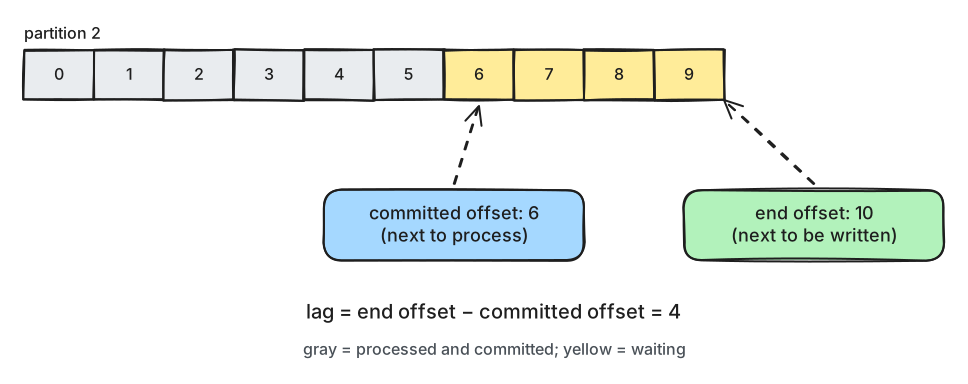
What to notice: lag is a count of records, not a time. Four records may be seconds or hours of work.
Lag is the first number to watch for any consumer group:
- Lag that rises and falls back to near zero is normal. Records arrive in bursts.
- Lag that keeps rising means the group is slower than the producers. It won't recover by itself; it needs faster processing or more members (up to the partition count).
- Lag in one partition only usually means one member is stuck, or one key is very busy.
The billing example in numbers: one worker at 2.5 events a second against 3.4 arriving means lag grows by about 3,200 events an hour. Three workers handle 7.5 a second, so the lag shrinks.
In production
- Choose the partition count for the members you'll need at peak, with room to grow (lesson 2.1). More partitions later moves keys to new partitions.
- Run members as identical processes with the same
group.id, and scale them up to the partition count, not past it. - Alert on lag that keeps growing, not on a fixed value. Some tools also report the time lag: how old the oldest unprocessed record is (lesson 8.3).
- Give every group a name that says what it does (
billing,grid-report). Never reuse one group id for two different services: they would split the records between them.
Practical
Note
Scripts: code/module-03/session_feed.py and
code/module-03/billing_worker.py (the notebook starts them)
· Notebook: code/module-03/01-consumer-groups-share-the-work.ipynb
· Lab services: kafka-1, kafka-2, kafka-3 · Time: ~15 min (about 2 minutes of waiting)
What you'll do: run a feed of 40 events a second and add billing workers one by one, watching the lag and who owns which partition. Then add one worker too many, and crash one.
The lab speeds up the example: the feed writes 40 events a second and each worker spends 50 ms on an event, so one worker handles about 20 a second.
Step 1: Start the session feed
The notebook creates the 6-partition topic m03l01-sessions and starts session_feed.py in the
background. Its output goes to a log file in code/.lab-logs/; you could run the same command in a
terminal instead.
$ python module-03/session_feed.py --topic m03l01-sessions --rate 40   (output: .lab-logs/m03l01-feed.log)
  [m03l01-feed] session feed: 40,000 events -> m03l01-sessions at 40/s via 127.0.0.1:9092,127.0.0.1:9093,127.0.0.1:9094
Step 2: One billing worker
The worker is a poll loop like the one above. It subscribes with its group id, logs its partitions
when the group assigns them, and fetches with consume():
    consumer = Consumer(consumer_config(args))
    consumer.subscribe([args.topic], on_assign=on_assign, on_revoke=on_revoke, on_lost=on_lost)
msgs = consumer.consume(num_messages=args.batch, timeout=0.5)
The notebook computes the group's lag with two admin calls, the committed offsets and the end offsets:
    committed = admin.list_consumer_group_offsets([ConsumerGroupTopicPartitions(GROUP, tps)])[GROUP].result()
    ends = admin.list_offsets({tp: OffsetSpec.latest() for tp in tps})
Then it starts worker A and prints the lag and the members every 5 seconds:
13:49:17  lag   314  members {'A': [0, 1, 2, 3, 4, 5]}
13:49:22  lag   422  members {'A': [0, 1, 2, 3, 4, 5]}
13:49:27  lag   527  members {'A': [0, 1, 2, 3, 4, 5]}
13:49:32  lag   634  members {'A': [0, 1, 2, 3, 4, 5]}
Step 3: Three workers
for name in ["B", "C"]:
    workers[name] = lab.start_script("module-03/billing_worker.py", "--name", name, "--topic", TOPIC,
                                     "--group", GROUP, "--work-ms", "50", name=f"m03l01-{name}")
13:49:37  lag   718  members {'A': [0, 1], 'B': [2, 3], 'C': [4, 5]}
13:49:42  lag   701  members {'A': [0, 1], 'B': [2, 3], 'C': [4, 5]}
13:49:47  lag   616  members {'A': [0, 1], 'B': [2, 3], 'C': [4, 5]}
13:49:52  lag   439  members {'A': [0, 1], 'B': [2, 3], 'C': [4, 5]}
13:49:57  lag   357  members {'A': [0, 1], 'B': [2, 3], 'C': [4, 5]}
Change it: seven workers, six partitions
Predict first: you start D, E, F and G in the same group. What does each of the seven get?
13:50:02  lag   175  members {'A': [0], 'B': [1], 'C': [2], 'D': [3], 'E': [4], 'F': [5], 'G': []}
13:50:07  lag   100  members {'A': [0], 'B': [1], 'C': [2], 'D': [3], 'E': [4], 'F': [5], 'G': []}
Break it: a worker crashes
The notebook stops D to G, then kills worker B with kill -9: no clean-up, no goodbye to the group,
like a power cut. Predict first: how long do B's partitions go unread?
members before the crash: {'A': [0, 1], 'B': [2, 3], 'C': [4, 5]}
+   5s  lag    97  members {'A': [0, 1], 'B': [2, 3], 'C': [4, 5]}
+  10s  lag   157  members {'A': [0, 1], 'B': [2, 3], 'C': [4, 5]}
...
+  40s  lag   549  members {'A': [0, 1], 'B': [2, 3], 'C': [4, 5]}
+  45s  lag   616  members {'A': [0, 1], 'C': [4, 5]}
+  50s  lag   635  members {'A': [0, 1, 2], 'C': [3, 4, 5]}
What just happened
One worker handled about 20 events a second against 40 arriving, so the lag grew by about 100 every
5 seconds and would never have recovered. B and C joined with the same group id, the group
rebalanced, and each worker got two partitions. Together they handled about 60 a second, so the lag
fell. With seven workers and six partitions, G got nothing: one member per partition is the limit.
When B was killed, it couldn't tell the group it was leaving. For 45 seconds, its
session.timeout.ms, the group still listed B as the owner of partitions 2 and 3, nobody read them,
and the lag grew by about 13 a second. Then the coordinator declared B dead and gave its partitions
to A and C.
Clean up
The last cell stops the workers and the feed, then deletes the topic and the group. If anything gets
stuck, docker compose down -v in the code/ folder resets the whole lab.
Key takeaways
- Consumers with the same
group.idshare a topic: each partition goes to one member of the group. - The partition count caps how many members of a group can work; extra members sit idle.
- Different groups read the same records independently.
- Lag = end offset − committed offset. Lag that keeps rising means the group can't keep up.
- A crashed member's partitions go unread until its session times out (45 s by default).