Poison pills and dead-letter topics
Sooner or later a consumer meets a record it can't process. What it does next decides whether one bad record costs you one record or a whole evening of data. This lesson shows the crash loop a single record can cause, how to park bad records with everything needed to fix them later, and why "park every error" throws good data away.
Theory
Example: the crash loop at 18:00
In March, Brightlane took over three sites with older chargers, site-V01 to site-V03. Their
firmware 3.9 sends readings in its own JSON format, with power in watts as text. The gateway's
legacy path forwarded those payloads unchanged into charging.telemetry, which otherwise holds Avro.
At 18:00 the first legacy reading arrived. The site-load worker failed to decode it and crashed. Kubernetes restarted it; it read the same record and crashed again. For three hours, at the evening peak, no reading on that partition was processed, and the grid report had a hole for a third of the network.
Poison pills
A poison pill is a record a consumer can never process, however often it tries. Maybe it can't be decoded (wrong format, a schema id the registry doesn't know), fails a check (a power of 9,999 kW), or hits a bug in the code.
With at-least-once processing (lesson 3.2), the consumer only commits after processing. A poison pill is never processed, so its offset is never committed: every restart reads it again and fails again. The whole partition stops behind it, and its lag only grows.
The two quick fixes are both bad. Skipping the record silently loses data and hides the bug. Crashing and alerting is honest, but it still stops the partition until someone deploys a fix.
Dead-letter topics
The usual answer is a dead-letter topic (DLQ, from "dead-letter queue"): the consumer writes the record it can't process to a separate topic, then commits and carries on. The parked record keeps:
- the original key and value bytes, unchanged, so nothing is lost;
- headers describing the problem: the error, its message, the source topic, partition and offset, and the time it was parked.
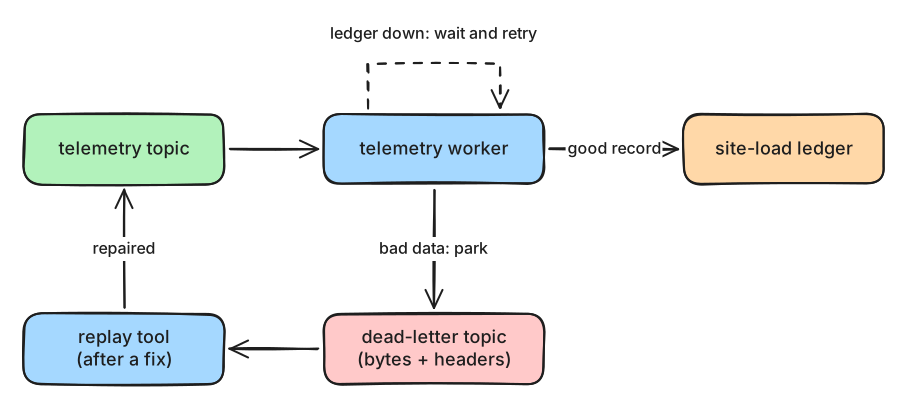
What to notice: only bad data goes to the dead-letter topic. A failure of something else, like the ledger, is waited out.
A dead-letter topic is only useful if someone looks at it. Alert on every new record in it, find the cause, fix the producer or the consumer, and then replay the parked records: a tool reads them, repairs or resends what it can, and commits its own position so nothing is replayed twice.
Retry or park?
The worker must tell two kinds of errors apart:
- Bad data is permanent: retrying the same bytes gives the same error. Park it.
- A temporary failure is outside the record: the database is locked, a service times out. The record is fine. Wait and retry it, with growing pauses (backoff), and don't move on. Parking it would throw good data away.
Decide by the type of error, not with except Exception. Keep retry waits well below
max.poll.interval.ms (lesson 3.3), or the group throws the waiting consumer out. For long outages,
pause the partition with consumer.pause() and keep polling. An error you didn't expect should stop
the worker and page someone: it may be a bug that would otherwise park everything.
In production
- Give each consumer group its own dead-letter topic, with retention long enough to investigate, for example 30 days.
- Make sure the parked record is stored (flush) before committing the source offset.
- Parking changes order: a replayed record arrives after newer ones with the same key. For readings that's fine; for a latest-status topic, the replay tool must not overwrite newer values.
- Fix the source too. Here the gateway should convert legacy payloads, not forward them.
- Kafka Connect has dead-letter topics built in (lesson 6.2).
Practical
Note
Script: code/module-05/telemetry_worker.py (the notebook starts it in three modes)
· Notebook: code/module-05/03-poison-pills-and-dead-letter-topics.ipynb
· Lab services: kafka-1, kafka-2, kafka-3, schema-registry · Time: ~15 min
What you'll do: write 600 readings, 30 of them legacy payloads, and run the same worker three ways: naive, careful with a dead-letter topic, and "park every error", the last two during a 2-second ledger outage.
Step 1: The readings, with the gateway's legacy bug
for key, reading, legacy_bytes in telemetry:
    producer.produce(TOPIC, key=key, value=legacy_bytes or serialize(reading, context))
600 readings, 30 of them legacy payloads, for example:
b'{"charger_id":"BL-V01-02","session":"ses-a5db25","power":"20500","energy_wh":"344","ts":"2026-10-05T17:31:07Z"}'
b'{"charger_id":"BL-V01-04","session":"ses-79f44e","power'
Step 2: A naive worker
In naive mode, any error ends the worker. The notebook restarts it three times, like a container platform would:
run 1: CRASH on p0@19: SerializationError: Invalid magic byte
run 2: CRASH on p0@19: SerializationError: Invalid magic byte
run 3: CRASH on p0@19: SerializationError: Invalid magic byte
lag: {0: (19, 600, 581)}
Step 3: A careful worker with a dead-letter topic
The careful worker parks what it can't decode or validate, and retries the ledger:
            except (SerializationError, ValueError) as e:    # bad data: retrying won't help, so park it
                park(msg, e)
                except sqlite3.OperationalError as e:
                    attempt += 1
                    delay = min(0.25 * 2 ** attempt, 4)
The run includes a 2-second ledger outage after 300 readings:
readings in the ledger: 570   parked: 30
18:57:14.760 RETRY 1 in 0.5s: database is locked
18:57:15.262 RETRY 2 in 1.0s: database is locked
18:57:16.267 RETRY 3 in 2.0s: database is locked
Step 4: What's in the dead-letter topic?
        headers = [("dlq.error.class", type(error).__name__), ("dlq.error.message", str(error)[:500]),
                   ("dlq.source.topic", msg.topic()), ("dlq.source.partition", str(msg.partition())),
                   ("dlq.source.offset", str(msg.offset())), ("dlq.parked.at", now())]
The first parked record:
dlq.error.class        SerializationError
dlq.error.message      Invalid magic byte
dlq.source.topic       m05l03-telemetry
dlq.source.partition   0
dlq.source.offset      19
dlq.parked.at          18:57:06.054
value: b'{"charger_id":"BL-V01-02","session":"ses-a5db25","power":"20500","energy_wh":"344","ts":"2026-10-05T17:31:07Z"}'
Counter({'Invalid magic byte': 30})
Break it: park every error
Predict first: a worker that sends any error to the dead-letter topic meets the same 2-second ledger outage. What happens to good readings?
readings in the ledger: 503   parked: 97
parked, by error: {'SerializationError': 30, 'OperationalError': 67}
What just happened
The first legacy payload, at offset 19, didn't start with Avro's magic byte, so the naive worker crashed on it. Because it never committed offset 19, every restart read the same record and crashed again: the committed offset stayed at 19 and the lag at 581. That's the evening the grid report lost. The careful worker parked the 30 legacy payloads with their original bytes and the headers needed to trace them, and went on. When the ledger was locked, it waited and retried the same reading, three times in 3.5 seconds, so all 570 good readings reached the ledger. The "park every error" worker treated the outage as bad data: in 2 seconds it parked 67 good readings, which are now missing from the ledger and mixed in with the real poison pills.
Clean up
The last cell deletes the topics, the subject, the groups and the ledgers. If anything gets stuck,
docker compose down -v in the code/ folder resets the whole lab.
Key takeaways
- A poison pill is never processed, so its offset is never committed: a naive consumer crash-loops on it.
- Park bad data in a dead-letter topic with its original bytes and headers saying what, where and why.
- Retry temporary failures with backoff instead; parking them throws good records away.
- Classify errors by type, alert on every parked record, and replay after the fix.
- A schema registry can't stop producers that bypass it; consumers still need a plan for bad records.
Next: Module 5 exercises