Event time and windows
The grid operator wants each site's energy per 5-minute window. Which window a reading belongs to sounds obvious, until readings arrive late. This lesson computes the same report by arrival time and by event time, and shows what a grace period buys, what it costs, and what one wrong clock can do.
Theory
Example: zero load, then double
On Thursday the grid operator's dashboard showed site-N03 using no energy at all between 18:05 and 18:10, and 38 kWh in the next five minutes, about twice its usual load. The operator's planners flagged it as a fault.
Nothing was wrong at the site. Its mobile link had dropped for five minutes. The chargers kept measuring, buffered their readings, and sent them when the link came back. The report put each reading in the window of the moment it arrived, so five minutes of readings moved one window later.
Event time and processing time
Every reading has two times (lesson 1.3):
- Event time: when the charger measured it, the
tsfield in the reading. - Processing time: when the reading reaches the processor. In this lab, it's the record's Kafka timestamp, set when the gateway received it.
Usually they're a second apart. When a link drops, a phone goes offline or a batch is replayed, they can be minutes or days apart. Results about the real world ("energy at 18:05") must use event time. Processing time only tells you about your pipeline.
Windows
A window groups events by time. The common kinds:
- Tumbling windows: fixed size, back to back, no overlap: 18:00–18:05, 18:05–18:10. The grid report uses them.
- Hopping windows: fixed size, overlapping, for example 5 minutes every minute.
- Session windows: one per burst of activity, closed after a gap with no events.
Stream time and the grace period
With event time, a processor can never be sure a window is complete: a late reading could still come. It has to decide when to report. Most stream processors use stream time, the latest event time seen so far, which only moves forward. They report a window once stream time has passed the window's end plus a grace period. Flink calls the same idea a watermark.
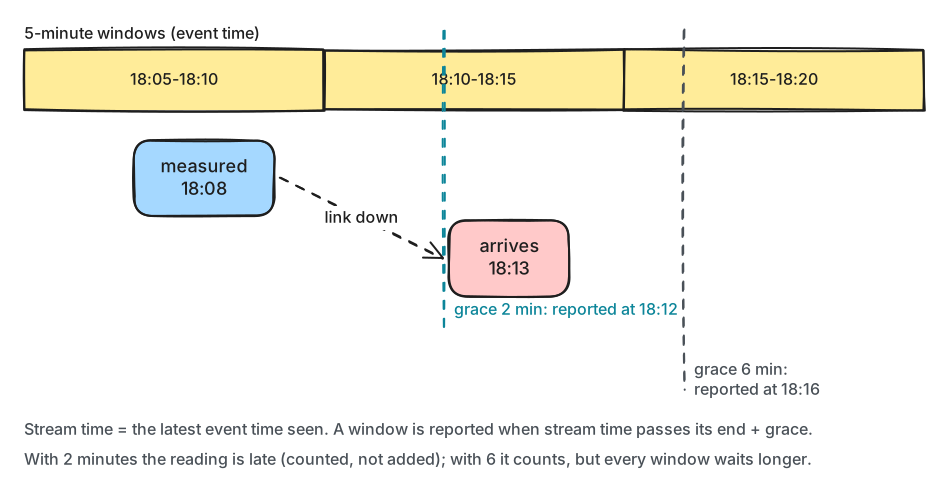
What to notice: a longer grace period makes every window more complete and every window later. There is no setting that gives both.
A reading for a window that has already been reported is late. The processor can drop it, count it, send it to a side topic, or report a corrected result for the window. Silently dropping it is the worst choice.
Stream time has two traps:
- One clock far ahead pushes stream time forward, and every open window closes early. Guard against event times far ahead of arrival.
- Several partitions: a processor tracks stream time per partition, and the overall time follows the slowest. One idle partition can hold every window open; frameworks have idle timeouts for that.
Frameworks
The lab does windowing by hand to show the mechanics. In production you would use a framework:
- Kafka Streams (Java and Kotlin): a library, with windows, grace periods, joins, state stores with changelogs and exactly-once processing, running inside your service.
- Apache Flink (2.3, with PyFlink for Python and Flink SQL): a separate cluster with watermarks, checkpoints to object storage, and exactly-once sinks. The most capable; also the most to operate.
- Quix Streams (3.27): a Python library with state stores, changelogs and windows. Version 3.27 requires confluent-kafka older than 2.13, so it can't share this course's environment.
In production
- Use event time for anything that describes the world: energy, revenue, counts per hour.
- Choose the grace period from measured lateness, for example the 99th percentile delay, and say in the output how complete a window is.
- Count late events, and send them somewhere instead of dropping them.
- Ignore event times far ahead of the arrival time, and alert on them: the charger's clock needs fixing.
- Emit each window once, when it closes, if consumers can't handle updates. Kafka Streams does this
with
suppress().
Practical
Note
Script: code/module-07/grid_report.py (the notebook runs it five times)
· Notebook: code/module-07/03-event-time-and-windows.ipynb
· Lab services: kafka-1, kafka-2, kafka-3 · Time: ~14 min
What you'll do: write an hour of readings with site-N03's outage, build the 5-minute report by arrival time and by event time with two grace periods, and add a charger whose clock is three hours ahead.
Step 1: One hour of readings, and a link that drops
Each reading is written with its arrival time as the record's timestamp:
producer.produce(topic, key=key, value=to_json(reading), timestamp=int(arrived.timestamp() * 1000))
25074 readings; 153 from site-N03 arrive late, for example:
  measured 18:05:01, arrived 18:10:01
Step 2: Windows by arrival time
        if args.time == "arrival":
            t = arrival
time=arrival grace=120s max-ahead=off
readings: 25074, windows reported: 325, late readings: 0, ignored (clock ahead): 0
site-N03 17:55-18:00   22.28 kWh   180 readings  late: 0
site-N03 18:00-18:05   22.33 kWh   180 readings  late: 0
site-N03 18:05-18:10    0.00 kWh     0 readings  late: 0
site-N03 18:10-18:15   38.43 kWh   273 readings  late: 0
site-N03 18:15-18:20   17.44 kWh   116 readings  late: 0
site-N03 18:20-18:25   19.07 kWh   120 readings  late: 0
Step 3: Windows by event time, with a 2-minute grace period
A window closes when the stream time has passed its end plus the grace period:
for site, start in sorted(k for k in open_windows if k[1] + width + timedelta(seconds=args.grace) <= t):
time=event grace=120s max-ahead=off
readings: 25074, windows reported: 326, late readings: 81, ignored (clock ahead): 0
site-N03 18:05-18:10    8.96 kWh    72 readings  late: 81
site-N03 18:10-18:15   18.06 kWh   120 readings  late: 0
Change it: a 6-minute grace period
time=event grace=360s max-ahead=off
readings: 25074, windows reported: 326, late readings: 0, ignored (clock ahead): 0
site-N03 18:05-18:10   20.37 kWh   153 readings  late: 0
site-N03 18:10-18:15   18.06 kWh   120 readings  late: 0
Break it: a clock three hours ahead
Predict first: one reading arrives at 18:07 from a charger whose clock says 21:07. What happens to the windows after it?
wrong clock at 18:07:09 says 21:07:09
time=event grace=120s max-ahead=off
readings: 25075, windows reported: 327, late readings: 12399, ignored (clock ahead): 0
site-N03 18:05-18:10    0.09 kWh     1 readings  late: 152
site-N03 18:10-18:15    0.09 kWh     1 readings  late: 119
With the guard, --max-ahead 300, which ignores event times more than 5 minutes after arrival:
time=event grace=120s max-ahead=300
readings: 25075, windows reported: 326, late readings: 81, ignored (clock ahead): 1
site-N03 18:05-18:10    8.96 kWh    72 readings  late: 81
What just happened
By arrival time, site-N03's five buffered minutes landed in the next window: 0 kWh, then 38 kWh, Thursday's dashboard exactly. By event time, every reading went to the window it was measured in. With 2 minutes of grace, the window 18:05–18:10 was reported at stream time 18:12. Its readings measured after 18:07 arrived after that, so 81 of them were late: counted, not added, and the window showed 8.96 kWh instead of 20.37. With 6 minutes of grace every window was complete, and every window for every site was reported 4 minutes later. The wrong clock pushed stream time to 21:07 in one step. Every open window closed at once, each later window was reported with its first reading only, and 12,399 readings were late. Ignoring event times too far ahead of their arrival kept stream time sane, and the results went back to the 2-minute grace numbers.
Clean up
The last cell deletes the topics. If anything gets stuck, docker compose down -v in the code/
folder resets the whole lab.
Key takeaways
- Use event time for results about the world; processing time shifts them whenever data is delayed.
- Tumbling windows split time into fixed slots; a window is reported when stream time passes its end plus the grace period.
- A longer grace period gives more complete windows that are reported later; late data must be counted, not dropped silently.
- One clock far ahead can close every window early: ignore event times far ahead of arrival.
- Kafka Streams, Flink (PyFlink) and Quix Streams provide windows, state and exactly once, so you don't build them by hand.
Next: Module 7 exercises