Schemas and the Schema Registry
Kafka stores bytes and never looks inside them. So nothing stops a producer from changing what its records mean, and the consumers find out the hard way. This lesson gives Brightlane's meter readings a schema, a written contract for every record, and shows where that contract lives and what it costs.
Theory
Example: two hours of zero load
Gateway release 4.3 started sending each reading's power in watts, as power_w, instead of
kilowatts as power_kw. The gateway team had mentioned it in their release notes. The grid team
hadn't read them.
The grid report read power with reading.get("power_kw", 0). For two hours it reported zero load
for every site whose chargers had the new release, until the grid operator called at 19:40 to ask
whether half the network had switched off. Kafka itself had no reason to complain: the records were
valid bytes, and that's all it checks.
Serialization and schemas
Producers serialize their objects into bytes; consumers deserialize them (lesson 1.3). With JSON the field names travel in every record, but nothing says which fields must be there, or what type or unit they have. Every consumer guesses, and a change on the producer side breaks the guesses silently.
A schema is a formal description of a record: its fields, their types, and their defaults. Three formats are common with Kafka:
- Avro: compact binary data, a schema written in JSON, and well-defined rules for changing the schema. It's the most common choice in Kafka pipelines, and the one this course uses.
- Protobuf: binary data with numbered fields, popular with teams that already use gRPC.
- JSON Schema: keeps JSON on the wire and checks it against a schema.
Avro writes the field values one after the other, in the schema's order, without their names. That makes records small, but no one can read them without the schema they were written with.
The Schema Registry
The Schema Registry is a separate service that stores schemas and gives each one a number, its
schema id. It also checks every new version of a schema against the earlier ones (lesson 5.2).
The registry keeps its data in a compacted Kafka topic, _schemas (lesson 4.3).
Schemas are grouped in subjects: a subject is a named list of versions of one schema. By
default, the schema of a topic's values goes in the subject <topic>-value, and the schema of its
keys in <topic>-key.
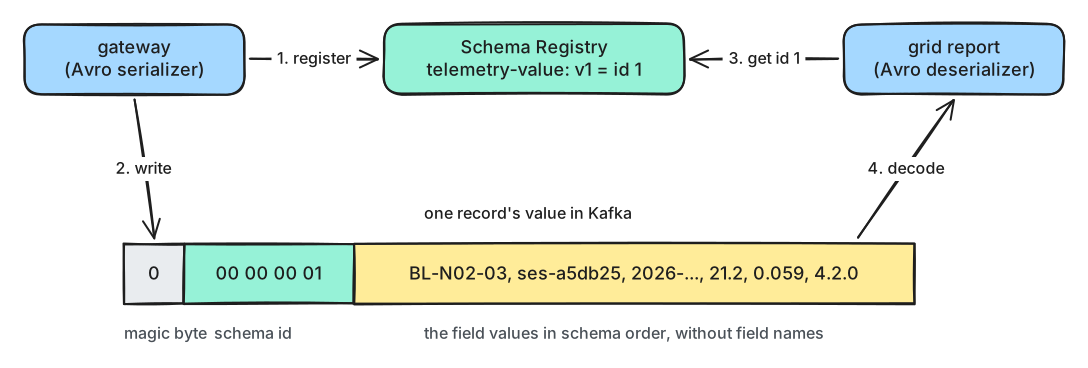
What to notice: every record carries only the schema's id. The registry is asked once per schema, not once per record.
Each record's value starts with five bytes, the wire format: a magic byte 0, then the schema
id as a 4-byte number, then the Avro data. The serializer and deserializer cache what they learn, so
the registry isn't involved in every record. It must be reachable, though, when a client meets a
schema for the first time. Newer Confluent clients can carry a schema identifier in a record header
instead; the 5-byte prefix is still the default.
Three registries speak the same API: Confluent Schema Registry (used in the lab; free to run, under the Confluent Community License, which is not an open-source licence), and the Apache-2.0 licensed Karapace and Apicurio Registry. The Python client works with all three.
Registering schemas in production
In the lab, the serializer registers its schema the first time it's used
(auto.register.schemas=true, the default). That's convenient and risky: any producer with a
typo creates a new version. In production:
- Keep schemas in the repository (
code/schemas/meter_reading.avschere), reviewed like code. - Register them from your build pipeline, after a compatibility check (lesson 5.2).
- Set
auto.register.schemas=falseon producers, withuse.latest.version=true, so they use the registered version.
In production
- Choose one format per topic and stick to it. Use Avro unless your teams already work with Protobuf.
- Keep simple keys, such as a charger id, as plain strings. An Avro-encoded key contains the schema id, so a new key schema version changes the key bytes, and the keys move to other partitions.
- Run at least two registry instances, and protect the
_schemastopic like any production data. - A schema checks types, not meaning. "Power is in kW and between 0 and 400" still needs a check in code (lesson 5.3).
Practical
Note
Notebook: code/module-05/01-schemas-and-the-schema-registry.ipynb
· Lab services: kafka-1, kafka-2, kafka-3, schema-registry · Time: ~12 min
What you'll do: start the Schema Registry, write meter readings with an Avro schema, look at their bytes, and read them back. Then try a renamed field, and a producer that skips the schema.
The registry is in the lab's schemas profile. Start it from the code/ folder:
docker compose --profile schemas up -d --wait
Step 1: The schema
charger_id  "string"                                           e.g. BL-N03-04
session_id  "string"                                           e.g. ses-7f3a19
ts          {"type": "long", "logicalType": "timestamp-millis"} when the charger measured
power_kw    "double"                                           power right now, in kW
energy_kwh  "double"                                           energy delivered since the session started, in kWh
firmware    "string"                                           charger firmware version, e.g. 4.2.1
timestamp-millis is a logical type: the data is a number (milliseconds since 1970), and the
schema says to read it as a time.
Step 2: Write readings with the schema
to_avro = lambda reading, ctx: {**reading, "ts": parse_iso(reading["ts"])}
serialize = AvroSerializer(registry, schema_str, to_avro)
context = SerializationContext(TOPIC, MessageField.VALUE)
producer.produce(TOPIC, key=reading["charger_id"], value=serialize(reading, context))
subjects: ['m05l01-telemetry-value']
subject m05l01-telemetry-value: version 1, schema id 4
The id depends on what was registered before; on a fresh lab it's 1.
Step 3: The bytes in Kafka
first 5 bytes: 00 00 00 00 04
magic byte: 0   schema id: 4
the rest: b'\x12BL-C08-02\x14ses-79f44e\x90\xbd\xf4\xd1\xa1h\x9a\x99\x99\x99\x99\xb9Q@' ...
all 200 readings as Avro: 10,800 bytes; as JSON: 26,776 bytes
Step 4: Read them back
deserialize = AvroDeserializer(registry)
print(deserialize(raw, context))
{'charger_id': 'BL-C08-02', 'session_id': 'ses-79f44e', 'ts': datetime.datetime(2026, 10, 5, 17, 31, 9, tzinfo=datetime.timezone.utc), 'power_kw': 70.9, 'energy_kwh': 0.197, 'firmware': '4.2.1'}
Break it: a renamed field, and a producer without a schema
Predict first: the gateway's new release builds readings with power_w instead of power_kw. What
happens when it serializes one with the registered schema?
producer side: ValueError: no value and no default for power_kw
Then a quick script writes one reading as plain JSON into the same topic:
consumer side, offset 83: SerializationError: Invalid magic byte
What just happened
The serializer registered the schema under m05l01-telemetry-value and got its id. Every record
then started with the magic byte and that id, followed by the values without field names, which is
why 200 readings took 40% of the space JSON needs. The deserializer read the id, fetched the schema
once, and rebuilt each reading, turning the timestamp-millis number back into a time. In the
break-it step, the renamed field failed at the producer: with a schema, the 19:40 phone call
becomes an error in the gateway's own tests. But the registry can't stop a producer that doesn't
use it, because Kafka accepts any bytes. The plain JSON record reached the topic, and the reader
only found out when the first byte wasn't the magic byte. Lesson 5.3 deals with such records.
Clean up
The last cell deletes the topic and the subject. If anything gets stuck, docker compose down -v
in the code/ folder resets the whole lab.
Key takeaways
- Kafka checks nothing inside a record; a schema makes the contract between producers and consumers explicit.
- Avro writes values without field names, so readers need the writer's schema: the registry stores it under an id.
- Each record starts with a magic byte and the 4-byte schema id; clients cache schemas, so the registry isn't asked per record.
- Subjects default to
<topic>-valueand<topic>-key. - In production, register schemas from the build pipeline and turn auto-registration off in producers.