Compacted topics: the latest value per key
Some topics are less a history than a table: what matters is the current value for each key. A compacted topic keeps that latest value and lets Kafka throw the older ones away. This lesson shows how compaction works, why it is slower than you might expect, and how to delete a key.
Theory
Example: the map that took six minutes to start
Brightlane's live map shows drivers and field technicians the status of every charger: Available,
Charging, Faulted or Offline. The map service reads charging.charger-status, where the gateway
writes a record each time a charger's status changes.
At every restart, the service read the topic from the beginning: 9 million status changes since the network opened. That took six minutes, and for those six minutes the map showed stale statuses. All it needed was 240 records: the latest one per charger.
Compaction
A topic with cleanup.policy=compact keeps at least the latest record for every key. Older
records with the same key are removed in the background by the log cleaner. The topic still
has the full order of the latest values, and offsets never change: a compacted partition just has
gaps between its offsets.
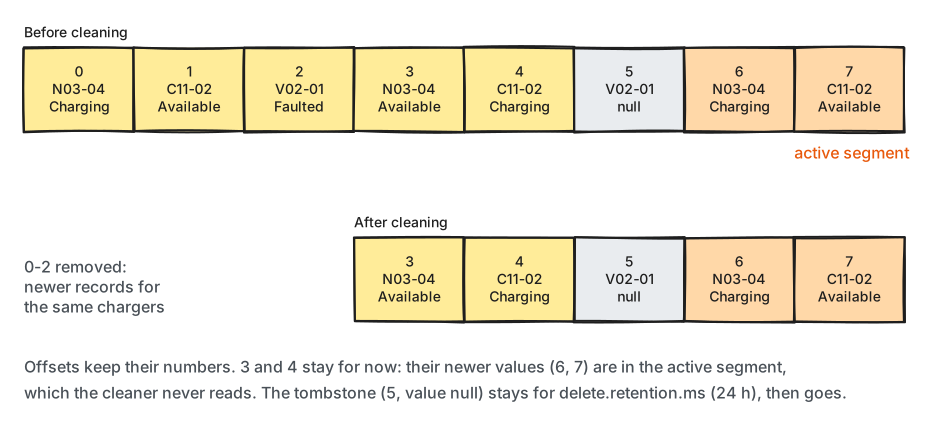
What to notice: the cleaner only works on closed segments, so a key can have several records in a compacted topic for a while.
A compacted topic needs keys: the broker rejects a record without one (INVALID_RECORD). Kafka
uses compaction itself, for example for the committed offsets of consumer groups in
__consumer_offsets.
When the cleaner cleans
Each broker runs cleaner threads (log.cleaner.threads, 1 by default) that look for work every 15
seconds (log.cleaner.backoff.ms). A partition's log has a cleaned part and a dirty part:
everything written since the last cleaning. The cleaner picks a partition once its dirty part is
at least min.cleanable.dirty.ratio of the log (0.5 by default).
As with retention (lesson 4.2), the active segment is never touched. With the default segment.ms
of 7 days, a quiet compacted topic may not be cleaned for a week. Two settings set limits in time:
min.compaction.lag.ms(0 by default): a record stays at least this long before it may be removed, so slow readers still see every change.max.compaction.lag.ms(no limit by default): a record becomes cleanable after this long at the latest, even if the dirty ratio is low. Use it when old values must be gone by a deadline.
Tombstones: deleting a key
To delete a key, you write a tombstone: a record with that key and no value (None in Python).
The cleaner removes the key's older records. It keeps the tombstone itself for
delete.retention.ms (24 hours by default), so that readers can see it, and then removes it too.
Two things to get right:
- Every reader must treat a missing value as "delete this key". Code that parses every value as JSON fails on the first tombstone.
- A reader that is more than
delete.retention.msbehind can miss a tombstone, and then keep a key that no longer exists. Set it longer than any reader can be down.
Rebuilding state on start-up
A service that keeps "the latest value per key" in memory starts like this:
- Note each partition's end offset.
- Read every partition from the beginning up to that offset, applying each record: store the value, or delete the key for a tombstone.
- Only then report "ready", and keep applying new records as they arrive.
Reading until a poll comes back empty is not enough: a slow broker can make you report "ready"
with half the data. You can also combine both policies, cleanup.policy=compact,delete: then keys
that haven't changed for retention.ms disappear as well.
In production
- Use compaction for "current state" topics keyed by an id: statuses, settings, prices, user profiles. Keep the full history in a separate topic with time retention if you need it.
- Make
delete.retention.mslonger than the longest time a reader can be stopped, for example a weekend. - Lower
segment.mson compacted topics that receive few records, or setmax.compaction.lag.ms. Otherwise nothing gets cleaned for a week. - Watch the cleaner (lesson 8.3): a stopped cleaner thread is silent, and its topics slowly fill the disk.
Practical
Note
Script: code/module-04/status_feed.py (the notebook starts it)
· Notebook: code/module-04/03-compacted-topics.ipynb
· Lab services: kafka-1, kafka-2, kafka-3 · Time: ~14 min (about 3 minutes of waiting)
What you'll do: write 3,000 status changes to a compacted topic, let a live feed and the cleaner run, rebuild the map, retire a charger with a tombstone, and check the map against the truth.
Step 1: A compacted topic
The lab settings make the cleaner work at lab speed: segments close every 10 seconds, a partition is cleaned as soon as 1% of it is outdated, and tombstones are kept for 20 seconds.
lab.recreate_topic(admin, TOPIC, partitions=3, config={
    "cleanup.policy": "compact", "segment.ms": "10000",
    "min.cleanable.dirty.ratio": "0.01", "delete.retention.ms": "20000"})
Step 2: Yesterday's status changes
3000 records for 240 chargers
Step 3: The live feed, and the cleaner at work
The status feed writes 2 new changes a second. Every 10 seconds the notebook reads the whole topic again:
time      records  chargers  records per partition
--------  -------  --------  ---------------------
18:14:09  3020     240       [1111, 1033, 876]
18:14:19  1215     240       [102, 1041, 72]
18:14:29  281      240       [108, 94, 79]
18:14:39  263      240       [95, 84, 84]
18:14:49  262      240       [94, 96, 72]
18:14:59  274      240       [100, 95, 79]
Step 4: Rebuild the live map
def load_map():
    status = {}
    for msg in read_all():
        status[msg.key().decode()] = json.loads(msg.value())["status"]
    return status
240 chargers loaded in 0.01 s: {'Available': 123, 'Charging': 95, 'Faulted': 14, 'Offline': 8}
Break it: retire a charger
Brightlane removes charger BL-N01-01 from service and writes a tombstone for it:
producer.produce(TOPIC, key=retired, value=None) # the tombstone
Predict first: what does load_map() do now?
load_map() failed: TypeError: the JSON object must be str, bytes or bytearray, not NoneType
The fixed loader treats a missing value as "delete":
        if msg.value() is None:
            status.pop(msg.key().decode(), None)           # tombstone: the charger is gone
239 chargers; BL-N01-01 in the map: False
The retired charger's records in the topic, every 10 seconds:
18:14:59 BL-N01-01 [(837, 'Available'), (903, 'tombstone')]
18:15:09 BL-N01-01 [(837, 'Available'), (903, 'tombstone')]
18:15:19 BL-N01-01 [(903, 'tombstone')]
18:15:29 BL-N01-01 [(903, 'tombstone')]
18:15:39 BL-N01-01 [(903, 'tombstone')]
18:15:49 BL-N01-01 []
Step 5: Does the map match the truth?
The feed plays the scenario's changes from number 3,001 on, so the expected map can be computed without Kafka:
feed sent 262 changes; map has 239 chargers; matches: True
records read to build it: 262, out of 3263 ever written
What just happened
The 3,000 changes all landed in each partition's first segment. Once the feed's next records
arrived after 10 seconds, those segments closed, the cleaner found them more than 1% dirty, and
kept only the latest record per charger. Partitions 0 and 2 were cleaned in the first 10 seconds,
partition 1 in the next 10: from 3,020 records to 281. The count never reached exactly 240,
because the feed's newest records sit in the active segments, which the cleaner leaves alone.
Rebuilding the map read about 270 records instead of 3,000. The tombstone
broke the first loader, which assumed every record has a value. In the topic, the charger's old
status went at the next cleaning. The tombstone stayed for its 20-second delete.retention.ms
and then went too, so a reader starting later never hears of BL-N01-01 at all. The final map,
built from 262 records, matched the 3,263 changes exactly.
Clean up
The last cell deletes the topic. If anything gets stuck, docker compose down -v in the code/
folder resets the whole lab.
Key takeaways
cleanup.policy=compactkeeps at least the latest record per key; offsets never change.- The cleaner skips the active segment and waits for
min.cleanable.dirty.ratio, so old values can linger. - A tombstone (key, no value) deletes a key; it stays for
delete.retention.ms, then goes. - Every reader of a compacted topic must handle tombstones.
- Rebuild state by reading from the beginning to the end offsets noted at start-up, then stay live.
Next: Module 4 exercises