Segments, retention and deleting data
Kafka keeps records for a set time and then deletes them by itself. That sounds simple, until an audit finds data that should have been gone days ago. This lesson shows how a partition is stored on disk, when records really disappear, and what you can do when someone asks you to delete data now.
Theory
Example: the 9-day-old readings
Brightlane's meter readings are linked to sessions, and sessions to drivers. So the privacy officer
set a rule: telemetry must be gone after 72 hours. The platform team set retention.ms on
charging.telemetry to 72 hours (259,200,000 ms) and closed the ticket.
Two months later, an audit read the oldest reading in each partition. Some were 9 days old. Nobody had changed the setting, and the brokers were working normally. The setting was right; the assumption about what it means was wrong.
Segments
Each replica of a partition is stored in its own folder on the broker, as a series of files called
segments. Kafka only ever appends to the newest one, the active segment. Each segment file is
named after the first offset it holds: 00000000000000000000.log, then
00000000000000000103.log, and so on, each with small index files next to it.
Kafka closes the active segment and starts a new one when the segment reaches segment.bytes
(1 GiB by default), or when its first record is older than segment.ms (7 days by default). It
checks this when the next record arrives.
How retention really works
With cleanup.policy=delete (the default), each broker looks for expired segments every
log.retention.check.interval.ms (5 minutes). It deletes a closed segment once the newest
record in it is older than retention.ms (7 days by default). It also deletes the oldest segments
while the partition is bigger than retention.bytes (no limit by default; the limit is per
partition).
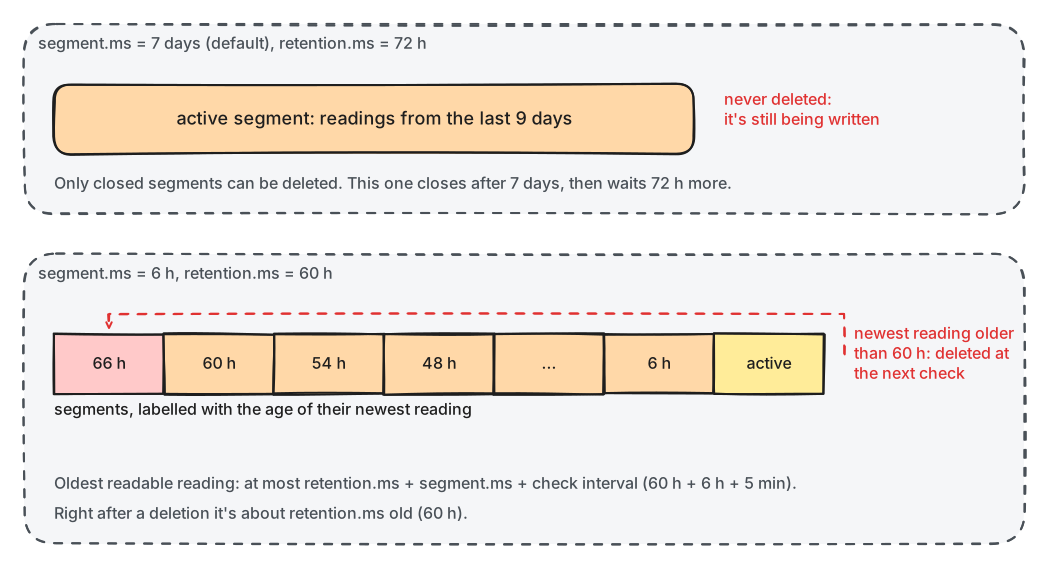
What to notice: retention deletes whole segments, never the active one, and counts from a segment's newest record.
Three things follow:
- Records live longer than
retention.ms: up toretention.ms+segment.ms+ the check interval. Brightlane's telemetry partitions take weeks to fill 1 GiB, sosegment.mscloses them every 7 days, and the oldest reading can be about 10 days old. That's the audit's finding. - Age comes from each record's timestamp, normally the time the producer created it. Since
Kafka 4.0, brokers reject records stamped more than an hour in the future
(
message.timestamp.after.max.ms), so a producer with a wrong clock can't keep data forever. - A deleted segment file stays on disk for one more minute (
log.segment.delete.delay.ms), but consumers can't read it any more.
The first offset still readable is the partition's log start offset. A consumer group whose
committed offset falls below it, because it stopped for longer than the retention, gets "offset out
of range" from the broker. The client then silently applies auto.offset.reset and continues from
the log start (earliest) or the end (latest). The records in between are skipped without an
error.
Deleting records before their time
delete_records() in the admin client (or kafka-delete-records.sh) moves a partition's log
start offset forward to an offset you choose. Every record before it is unreadable at once, and
segments that only held such records are deleted at the next check.
You can only cut off the beginning of a partition. Kafka has no way to delete one record from the middle of a topic with the delete policy. When a single driver asks to be forgotten, you have three tools:
- Short retention, set as above, so the data ages out within the deadline.
- Compacted topics with the driver's id as the key: a tombstone removes that key's records (lesson 4.3).
- Crypto-shredding: encrypt each driver's personal fields with a key per driver, stored outside Kafka. Deleting the key makes every copy unreadable, in Kafka and everywhere else.
Tiered storage
Tiered storage (generally available since Kafka 3.9) copies closed segments to object storage
such as S3, and keeps only the recent ones on the brokers' disks. Consumers can still read the old
segments; they are just slower to fetch. You turn it on per broker
(remote.log.storage.system.enable) and per topic (remote.storage.enable), and choose the local
part with local.retention.ms. retention.ms still decides when data is gone everywhere. Kafka
itself ships no production plug-in for the object store, so you add one, such as Aiven's
open-source plug-in. Compacted topics can't use tiered storage. The lab doesn't run it.
In production
- For a deletion deadline, choose
retention.ms+segment.ms+ 5 minutes ≤ the deadline, and remember the copies outside Kafka: consumers' databases, backups, other clusters. - Don't make segments tiny to be safe: every segment costs open files and index memory on each broker. Hours, not seconds.
- Alert when a group's lag, measured in time, approaches the topic's retention.
- Choose
auto.offset.reseton purpose. In the Python client,auto.offset.reset=errormakes an out-of-range position an error your code sees, instead of a silent jump.
Practical
Note
Script: code/module-04/steady_writer.py (the notebook starts two copies)
· Notebook: code/module-04/02-segments-retention-and-deleting-data.ipynb
· Lab services: kafka-1, kafka-2, kafka-3 · Time: ~16 min (about 4 minutes of waiting)
What you'll do: watch two topics with the same 60-second retention, one with 20-second segments and one with the default. Then fix the second one, bring back a consumer that stopped for too long, and delete records on request.
The lab's brokers look for expired segments every 10 seconds, not every 5 minutes, so you see
retention within the lesson. That's set in compose.yaml:
KAFKA_LOG_RETENTION_CHECK_INTERVAL_MS: "10000"
Step 1: Two topics, two writers, one archive job
lab.recreate_topic(admin, SMALL, partitions=1, config={"retention.ms": "60000", "segment.ms": "20000"})
lab.recreate_topic(admin, DEFAULT, partitions=1, config={"retention.ms": "60000"})
A writer sends 5 readings a second to each. An archive job reads the first 20 readings of the first topic, commits, and stops:
archive job stopped after offset 19
Step 2: Watch segments come and go
segments(topic) lists the segment files on the partition leader's disk, and oldest(topic)
returns the age of the oldest record still readable:
listing = lab.compose("exec", "-T", f"kafka-{leader}", "ls", "-l", f"/var/lib/kafka/data/{topic}-0", echo=False)
Every 10 seconds for 2 minutes:
time      segments (first offsets)  oldest s  default: segments  default: oldest s
--------  ------------------------  --------  -----------------  -----------------
17:54:46  [0]                       14        1                  14
17:54:56  [0, 103]                  24        1                  24
...
17:55:37  [0, 103, 204, 304]        65        1                  65
17:55:47  [0, 103, 204, 304]        75        1                  75
17:55:58  [103, 204, 304, 405]      65        1                  86
17:56:08  [103, 204, 304, 405]      76        1                  96
17:56:19  [204, 304, 405, 505]      66        1                  107
...
17:56:39  [304, 405, 505, 606]      66        1                  127
Step 3: Change it: give the default topic smaller segments
fix = ConfigResource("topic", DEFAULT, incremental_configs=[
    ConfigEntry("segment.ms", "20000", incremental_operation=AlterConfigOpType.SET)])
time      segments (first offsets)  oldest s  default: segments  default: oldest s
--------  ------------------------  --------  -----------------  -----------------
17:56:49  [304, 405, 505, 606]      76        2                  137
17:56:59  [405, 505, 606, 706]      66        3                  148
...
17:57:40  [606, 706, 807, 907]      67        5                  188
17:57:51  [606, 706, 807, 907]      77        4                  71
17:58:01  [706, 807, 907, 1007]     68        5                  82
Break it: the archive job comes back
Predict first: the archive job committed offset 20 about four minutes ago. Where does it continue?
committed offset: 20   log start offset now: 706   first reading it got: offset 706
readings the archive job never saw: 686
Step 4: Delete records on request
A privacy request: delete every reading in the first topic written before now.
result = admin.delete_records([TopicPartition(SMALL, 0, end)])
new log start offset: 1099
segment files right after: [(706, 22513), (807, 22292), (907, 22301), (1007, 21048)]
segment files 15 s later: [(1007, 22616), (1108, 15452)]
What just happened
On the first topic, a new segment started about every 20 seconds, and the oldest segment went once
its newest reading was older than 60 seconds. So the oldest readable reading was never exactly 60
seconds old: it swung between about 65 and 80 seconds, within the 90 that retention.ms +
segment.ms + the check interval allows. The second topic had one active segment, which retention never deletes, so its
oldest reading just kept ageing: that's the audit's 9-day-old reading. After segment.ms was set,
the big segment closed at the next write, but it was only deleted about 60 seconds later, because
its newest reading had only just been written. The archive job's committed offset 20 no longer
existed. Its consumer quietly fell back to auto.offset.reset=earliest and skipped 686 readings
without an error. Finally, delete_records() made every older reading unreadable at once. The files
that only held deleted readings were gone at the next check, while segment 1007, which also held
newer readings, stayed.
Clean up
The last cell stops the writers and deletes both topics and the groups. If anything gets stuck,
docker compose down -v in the code/ folder resets the whole lab.
Key takeaways
- A partition is a series of segment files; only closed segments can be deleted.
- A record can live up to
retention.ms+segment.ms+ the check interval. For a deadline, set both settings. - A consumer that falls behind the log start offset skips data silently, as
auto.offset.resetsays. delete_records()cuts off the beginning of a partition at once; single records need compaction or crypto-shredding.- Tiered storage moves old segments to object storage; retention still decides when data is gone.