Day-2 operations: change without downtime
Setting up a cluster is day 1. Everything after that, changing topics, restarting brokers, upgrading, replacing hardware, is day 2, and it happens while producers and consumers keep running. This lesson does each of these changes with traffic flowing, and shows the one mistake that stops it.
Theory
Example: one busy week
Brightlane's takeover of the motorway operator is signed: 6,000 more chargers come online over the next months, about 25 times today's traffic. In the same week, a Kafka patch release fixes a bug that Brightlane has hit twice, and kafka-1's disk starts reporting errors. The platform team has to:
- give
charging.telemetrymore partitions for the growth; - restart every broker on the new patch version;
- move kafka-1's data to the other brokers before its disk is replaced.
The gateway, billing and grid reporting keep running throughout. Nobody gets a maintenance window.
Topics as code
Changes made by hand, one command at a time, are forgotten. Three months later nobody knows why
charging.sessions keeps only one hour of data, or whether that was on purpose. Topics as code
keeps each topic's partitions, replication factor and settings in a file under version control.
A change is an edit to the file, reviewed like any other code. A tool then compares the file with the
cluster and applies the difference:
  charging.telemetry:
    partitions: 6
    replication_factor: 3
    config:
      retention.ms: 216000000        # 60 h + 6 h segments: every reading gone within 72 h (exercise 4.1)
      segment.ms: 21600000
      min.insync.replicas: 2
The file is also where naming rules live. Brightlane names topics <domain>.<what>, such as
charging.sessions or billing.session-charges, so a team's topics share a prefix that ACLs (lesson
8.2) can use. Choose names carefully: a topic can't be renamed, only copied to a new one.
The comparison always runs first as a plan: the list of changes, without making them. A plan
also finds drift, settings someone changed on the cluster without changing the file. Some
changes can't be applied directly. Kafka can't remove partitions, and changing the replication factor
needs a reassignment, below. The practical builds a small plan-and-apply with the AdminClient. In
real projects, the Terraform provider for Kafka or Strimzi's KafkaTopic resources do the same.
Sizing for the growth plan
A topic's partition count limits how many consumers in a group can share its work (lesson 3.1). To size it, divide the peak rate by what one consumer instance handles. Suppose one grid reporting instance handles 300 readings a second. The growth plan's peak of 2,500 readings a second (lesson 2.3) then needs 9 instances, so at least 9 partitions. 12 leaves room, and divides evenly among 2, 3, 4, 6 or 12 instances.
The brokers' size follows from bytes. A reading is about 200 bytes once stored with its key, so the peak is 500 KB/s. As an upper bound, assume the peak lasts all day:
| Telemetry at 2,500 readings/s | Stored |
|---|---|
| per day | 43 GB |
| per day, 3 replicas | 130 GB |
| 72 h retention, whole cluster | 390 GB |
| 72 h retention, per broker | 130 GB |
With room to spare, 250 GB disks per broker; compression shrinks this further. The network carries 500 KB/s in, twice that between brokers for replication, and 500 KB/s out per consumer group: a few MB/s, far below any data-centre link. Consumers that keep up read from the operating system's page cache, and ten minutes of telemetry at peak is 300 MB of memory. So Brightlane's growth is a small load for three brokers; partitions and availability matter more than raw capacity.
Adding partitions moves keys
You can add partitions to a topic at any time, but never remove them. And adding them changes where keys go. The partitioner picks a key's partition as its hash modulo the partition count (lesson 2.1). Change the count, and many keys land in a different partition. A charger's new readings go to the new partition while older ones may still wait, unread, in the old one, so for a short time a consumer can see them out of order. A compacted topic keeps the old value of a moved key in the old partition.
So: size keyed topics for a year or two of growth from the start. When you must add partitions, do it at a quiet moment, and check what the consumers do with per-key order. For a compacted topic, create a new topic and copy the data over instead.
Rolling restarts and feature versions
A rolling restart restarts the brokers one at a time, so the cluster keeps serving throughout. Each broker stops with a controlled shutdown (lesson 4.1): it hands its leaderships to other replicas before it exits. The rule that makes it safe is to wait between brokers. Before restarting the next one, wait until every partition is fully replicated again: zero under-replicated partitions.
Why waiting matters: with replication factor 3 and min.insync.replicas=2, every partition
survives one broker being away. If two are away at once, partitions that had replicas on both lose
their quorum of in-sync replicas, and acks=all writes stop. In the lab, each broker is also a
controller; two of three controllers away means no majority, so no new leaders can be chosen either.
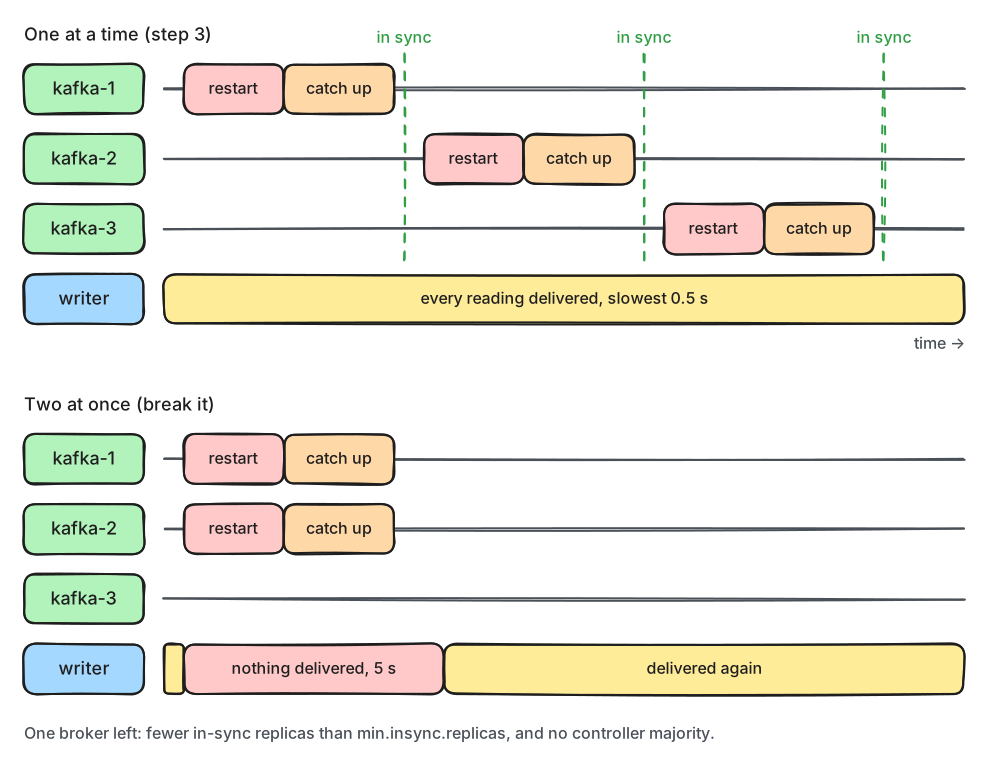
What to notice: the restart itself takes the same few seconds in both rows. The difference is only the waiting.
An upgrade is a rolling restart onto new software. New software can bring new formats for the
metadata log and new protocol behaviour, and brokers on the old version wouldn't understand them.
So they stay switched off until you raise the cluster's feature versions: metadata.version,
transaction.version, group.version and others. You raise them with kafka-features.sh upgrade,
after every broker runs the new software. Until then, you can still roll back the software.
Patch releases, such as 4.3.0 to 4.3.1, normally keep the feature versions as they are.
Moving replicas
Kafka never moves existing partitions by itself. A new broker only gets partitions created after
it joined, and a broker being retired keeps its replicas until you move them. Partition
reassignment moves replicas between brokers. You give kafka-reassign-partitions.sh a plan in
JSON, the new replica list per partition. Each new replica copies the partition's data from the
leader, joins the ISR, and then the old replica is deleted.
That copy is a lot of network and disk traffic. A replication throttle (--throttle, in bytes
per second) limits it, so the move doesn't slow down producers and consumers. Rerun the tool with
--verify to see the progress; once the move is complete, --verify also removes the throttle.
Tools such as Cruise Control generate and run such plans to keep a cluster balanced.
In production
- Automate the checks. On Kubernetes, the Strimzi operator restarts brokers one at a time and waits for replication. Managed services restart and upgrade brokers for you.
- Before each restart, check that no partitions are under-replicated or under min ISR, and that the
controller quorum is healthy (
kafka-metadata-quorum.sh describe --status). - Give a stopping broker time to finish its controlled shutdown. Docker stops a container forcefully after 10 seconds by default; a broker killed that way recovers its logs at the next start, which takes longer.
- Read the upgrade notes of every release. Brokers and clients can be upgraded independently: new clients work with older brokers and the other way round, within limits; Kafka 4.0 dropped clients older than 2.1.
- Move replicas in batches with a throttle, and watch the cluster's network and request latency.
- Spread brokers over failure zones, such as data-centre rooms or cloud availability zones, and set
broker.rackon each. Kafka then puts a partition's replicas in different zones (rack awareness), so losing a zone loses one copy. Consumers can read from a replica in their own zone, which saves cross-zone traffic: setclient.rackon the consumer andreplica.selector.classon the brokers.
Practical
Note
Notebook: code/module-08/04-day-2-operations.ipynb
· Topics file: code/module-08/topics.yaml
· Lab services: kafka-1, kafka-2, kafka-3 · Time: ~16 min
What you'll do: apply topics.yaml to the cluster, catch a change made by hand, add partitions
and see which chargers move, restart all three brokers under load, read the feature versions, and
move replicas off kafka-1 with a throttle. Then restart two brokers at once.
Step 1: Plan, then apply
plan() reads the cluster with list_topics() and describe_configs(), and compares. One part of
it finds drift: a setting stored on the topic but not in the file.
        for key, entry in configs[name].items():                 # set on the topic, but not in the file
            if ConfigSource(entry.source) == ConfigSource.DYNAMIC_TOPIC_CONFIG and key not in wanted:
                changes.append(("remove", name, key, f"{entry.value} -> cluster default"))
change  topic                    setting  detail
------  -----------------------  -------  ------------------
create  charging.telemetry                6 partitions, RF 3
create  charging.sessions                 6 partitions, RF 3
create  billing.session-charges           6 partitions, RF 3
create  charging.charger-status           3 partitions, RF 3
apply() makes each change with the AdminClient, then the plan is empty:
applied  create charging.telemetry
applied  create charging.sessions
applied  create billing.session-charges
applied  create charging.charger-status
plan now: []
Step 2: A change by hand, and the growth plan
The on-call engineer's change from last night, made with kafka-configs.sh, and the growth plan's
12 partitions for telemetry:
change          topic               setting            detail
--------------  ------------------  -----------------  ---------------------------
add partitions  charging.telemetry                     6 -> 12
set             charging.sessions   retention.ms       3600000 -> 604800000
remove          charging.sessions   max.message.bytes  10485760 -> cluster default
Before applying, the notebook writes one reading per charger and notes its partition, then does the same after:
applied  add partitions charging.telemetry
applied  set charging.sessions retention.ms
applied  remove charging.sessions max.message.bytes
chargers in a different partition now: 109 of 240
for example: BL-N01-01 2 -> 8, BL-N01-02 1 -> 7, BL-N01-03 1 -> 7, BL-N01-04 3 -> 9
Step 3: A rolling restart with a writer running
The steady writer from lesson 4.1 writes 50 readings a second to charging.telemetry. The brokers
restart one at a time:
for node in settings.KAFKA_NODES:
    lab.wait_until(lambda: under_replicated() == 0, timeout=120, interval=1, what="all replicas in sync")
    started = time.monotonic()
    lab.compose("restart", node, echo=False)
kafka-1: restarted in 3 s, all replicas in sync after 13 s
kafka-2: restarted in 3 s, all replicas in sync after 13 s
kafka-3: restarted in 3 s, all replicas in sync after 6 s
stopped: sent=1995 delivered=1995 failed=0 not answered=0
slowest delivery: 521 ms; seconds with nothing delivered: 0
Step 4: Feature versions
Feature: eligible.leader.replicas.version          SupportedMinVersion: 0                SupportedMaxVersion: 1                FinalizedVersionLevel: 1                Epoch: 81239
Feature: group.version                             SupportedMinVersion: 0                SupportedMaxVersion: 1                FinalizedVersionLevel: 1                Epoch: 81239
Feature: kraft.version                             SupportedMinVersion: 0                SupportedMaxVersion: 1                FinalizedVersionLevel: 0                Epoch: 81239
Feature: metadata.version                          SupportedMinVersion: 3.3-IV3          SupportedMaxVersion: 4.3-IV0          FinalizedVersionLevel: 4.3-IV0          Epoch: 81239
Feature: share.version                             SupportedMinVersion: 0                SupportedMaxVersion: 1                FinalizedVersionLevel: 1                Epoch: 81239
Feature: streams.version                           SupportedMinVersion: 0                SupportedMaxVersion: 1                FinalizedVersionLevel: 1                Epoch: 81239
Feature: transaction.version                       SupportedMinVersion: 0                SupportedMaxVersion: 2                FinalizedVersionLevel: 2                Epoch: 81239
Your epoch differs.
Step 5: Move replicas off kafka-1, with a throttle
The archive topic has two replicas per partition and 60 MB of data, two partitions with a replica on kafka-1. The plan moves them to kafka-2 and kafka-3, copying at most 2 MB/s:
out = lab.kafka_cli(*reassign, "--execute", "--throttle", "2000000", echo=False)
replicas now: {0: [1, 2], 1: [2, 3], 2: [3, 1]}
Successfully started partition reassignments for charging.telemetry-archive-0,charging.telemetry-archive-1,charging.telemetry-archive-2
+  4 s  replicas: {0: [2, 3, 1], 1: [2, 3], 2: [3, 2, 1]}  copying
+  8 s  replicas: {0: [2, 3, 1], 1: [2, 3], 2: [3, 2, 1]}  copying
+ 13 s  replicas: {0: [2, 3], 1: [2, 3], 2: [3, 2]}  done
Clearing broker-level throttles on brokers 1,2,3
Clearing topic-level throttles on topic charging.telemetry-archive
Break it: two brokers at once
Predict first: the same restart, but kafka-1 and kafka-2 together. What does the writer see?
lab.compose("restart", "kafka-1", "kafka-2", echo=False)
both back and in sync after 6 s
stopped: sent=707 delivered=707 failed=0 not answered=0
slowest delivery: 6562 ms; seconds with nothing delivered: 5
What just happened
The plan found everything that differed from the file: four missing topics first, then the
hand-made changes. It set retention.ms back, because the file names it, and removed
max.message.bytes, because the file doesn't. Going from 6 to 12 partitions moved 109 of 240
chargers. A charger's partition is its key's hash modulo the count. Keys whose hash modulo 12 is 6
or more moved from partition p to p + 6, one of the new partitions; the others stayed. That's about
half the keys.
The rolling restart lost nothing and stalled nothing: every reading was delivered, the slowest in about half a second, while each broker was away. Waiting for zero under-replicated partitions before each restart kept two in-sync replicas for every partition at all times.
The feature list shows the cluster runs everything its software supports, metadata.version
4.3-IV0, so there was nothing to raise. kraft.version 0 means the lab's controllers are a fixed
list in the configuration.
During the reassignment, partitions 0 and 2 briefly had three replicas: the new one copying, the old
one still serving. After about 13 seconds, 40 MB copied at the 2 MB/s throttle, kafka-1 held no
replica of the archive, and --verify removed the throttle.
In the break-it step, the restart took the same few seconds. But with two brokers away, partitions
had one in-sync replica, below min.insync.replicas, and the controllers had no majority. For 5
seconds nothing was delivered, and the slowest reading took 6.6 seconds. The producer retried, so
nothing was lost. With a shorter delivery timeout, or a longer outage, readings would have failed.
Clean up
The last cell deletes the topics of topics.yaml and the archive topic.
Key takeaways
- Keep topics as code: a reviewed file, a plan that shows changes and drift, then apply.
- Partitions can only be added, and adding them moves keys to new partitions; size keyed topics ahead.
- Restart brokers one at a time and wait for zero under-replicated partitions in between; two at once stops
acks=allwrites. - Upgrade the software first, with a rolling restart, then raise the feature versions with
kafka-features.sh. - Kafka never rebalances existing partitions on its own; move replicas with
kafka-reassign-partitions.shand a throttle.
Next: Module 8 exercises