Encryption and authentication
Until now, any program could connect to the lab's brokers without a password, and everything crossed the network as plain text. This lesson closes that door: an encrypted connection, a broker that proves who it is, and a login for every service.
Theory
Example: a laptop on the office Wi-Fi
In September an outside security firm tested Brightlane's network. From a laptop on the office guest
Wi-Fi, the tester found the brokers on port 9092 and ran an ordinary consumer. Within ten minutes
they had read a day of meter readings, about 2 million, and a week of charging sessions with driver
ids. Then they wrote one fake session_stopped event, and billing charged a driver for a session
that never happened.
The report had three findings:
- The traffic isn't encrypted: anyone on the network path can read it.
- The brokers don't know who connects: any program is welcome.
- Every client may do everything: read and write any topic, even delete topics.
This lesson fixes the first two. Lesson 8.2 fixes the third.
Listeners and security protocols
A listener is a network port the broker accepts connections on, with a name and a security
protocol. Lesson 1.2 met the lab's listeners: one for your Mac on ports 9092–9094, one for containers
on port 19092. Both use PLAINTEXT: no encryption and no login.
Kafka has four security protocols:
| Protocol | Encrypted | Client logs in |
|---|---|---|
PLAINTEXT |
no | no |
SSL |
yes, with TLS | only with a client certificate |
SASL_PLAINTEXT |
no | yes |
SASL_SSL |
yes, with TLS | yes |
The lab's secure broker, kafka-secure in the compose profile secure, has two listeners:
listeners=SASL_SSL://0.0.0.0:9095,CONTROLLER://127.0.0.1:9097
advertised.listeners=SASL_SSL://127.0.0.1:9095
listener.security.protocol.map=SASL_SSL:SASL_SSL,CONTROLLER:PLAINTEXT
controller.listener.names=CONTROLLER
inter.broker.listener.name=SASL_SSL
listener.security.protocol.map gives each listener name its protocol; here the client listener is
simply named after its protocol. Clients and broker-to-broker traffic use SASL_SSL. The controller
listener is plain, but it listens on 127.0.0.1 inside the container, where nothing else can reach
it. In a real cluster the controllers run on other machines, and that listener needs TLS too.
TLS: encryption, and proof of the broker's identity
TLS (Transport Layer Security, the "S" in HTTPS) encrypts a connection and lets the client check who is at the other end. Kafka still calls it "SSL", TLS's old name, in its setting names.
The broker proves its identity with a certificate: a small file with the broker's names and its public key, signed by a certificate authority (CA). A CA is a key pair whose signature both sides have agreed to trust. During the TLS handshake the client checks two things:
- The signature. A CA the client trusts signed the certificate. The client's
ssl.ca.locationpoints at that CA's certificate. - The name. The certificate lists the address the client connected to. This check is
hostname verification. The Python client does it by default since librdkafka 2.0
(
ssl.endpoint.identification.algorithm=https). Without it, any certificate from the same CA would pass, including one issued for another machine.
The broker needs its private key and its certificate chain. Since Kafka 2.7 these can be plain PEM files, the format most tools produce; Java keystores still work:
ssl.keystore.type=PEM
ssl.keystore.location=/etc/kafka/secrets/server.pem
The practical makes its own CA, as small companies do for internal systems. In larger companies the security team runs the CA, often through a tool such as HashiCorp Vault or cert-manager.
TLS can also identify the client: with ssl.client.auth=required, each client needs a certificate
too, and its name becomes the client's identity. This is mutual TLS. A broker setting,
ssl.principal.mapping.rules, turns a certificate name such as CN=svc-billing,O=Brightlane into
the identity svc-billing. Mutual TLS works well where every service already gets a certificate.
This course uses passwords instead, which need no certificate per service.
SASL and SCRAM: proof of the client's identity
SASL (Simple Authentication and Security Layer) is a standard way to add a login to a network protocol. Kafka runs it right after the TLS handshake, with one of several mechanisms:
SCRAM-SHA-256andSCRAM-SHA-512: a user name and password, checked against hashes the cluster stores. This course's choice.OAUTHBEARER: a token from an identity provider such as Keycloak or Okta. Good where services already get tokens for single sign-on.GSSAPI: Kerberos, where a company already runs it.PLAIN: the password is sent as it is, so only over TLS. Kafka's own check reads the users from the broker's configuration; real deployments plug in their own check. Managed services use it for API keys.
SCRAM (Salted Challenge Response Authentication Mechanism) never sends the password, not even inside TLS. For each user the cluster stores a random salt, an iteration count, and keys derived from the password. At login, both sides exchange random challenges and prove they know those keys. A copy of the cluster's metadata doesn't contain any password.
In KRaft clusters the SCRAM credentials live in the metadata log. You create them with the Admin API
(alter_user_scram_credentials() in Python) or kafka-configs.sh. The first user is special: the
broker needs it to talk to itself before any API works, so it's added when the storage is formatted:
  /opt/kafka/bin/kafka-storage.sh format --cluster-id "$CLUSTER_ID" --config /opt/lab/server.properties \
    --add-scram "SCRAM-SHA-512=[name=admin,password=$ADMIN_PASSWORD]"
After the login, the connection has a principal: the identity the broker uses for everything it
decides about this client, written User:svc-billing. ACLs and quotas (lesson 8.2) refer to
principals.
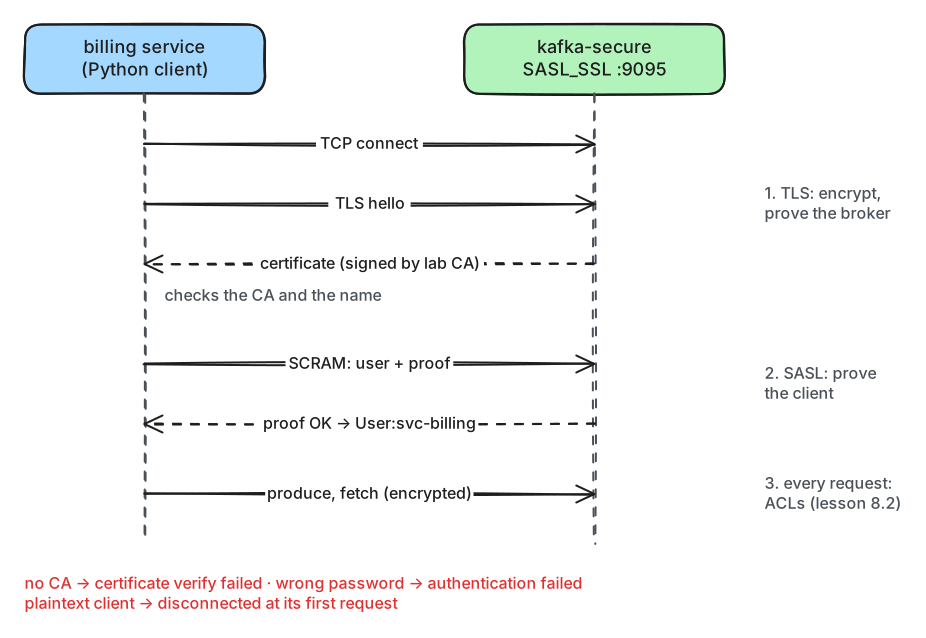
What to notice: the broker proves itself first, then the client, and only then do Kafka requests flow. Each failure in the practical stops at a different step.
The client and the broker's own secrets
A Python client needs five settings for a SASL_SSL listener with SCRAM:
    return {"bootstrap.servers": settings.SECURE_BOOTSTRAP,
            "security.protocol": "SASL_SSL",        # TLS, then a SASL login
            "sasl.mechanism": "SCRAM-SHA-512",
            "sasl.username": user, "sasl.password": password,
            "ssl.ca.location": str(CA_FILE)}        # trust certificates signed by the lab's CA
The broker has a password too: it logs in as admin to talk to itself. A config provider keeps
it out of the configuration file and fills it in at start-up, here from an environment variable.
Kafka also ships providers that read files and directories, such as secrets mounted into a
container.
config.providers=env
config.providers.env.class=org.apache.kafka.common.config.provider.EnvVarConfigProvider
The setting that holds the password then says password="${env:ADMIN_PASSWORD}".
In production
- Kafka's defaults are open:
PLAINTEXTlisteners, no authorizer, so no permission checks at all, andauto.create.topics.enable=true, which creates a topic for any client that writes to an unknown name. Change all three. The lab's brokers don't create topics automatically, and its secure broker has neither of the other two. - Use
SASL_SSL, orSSLwith client certificates, on every listener clients can reach. Encrypt broker-to-broker and controller traffic too, unless that network is private. - TLS protects data on the network only. On the brokers' disks, records are stored as the producer sent them. Encrypt the disks for data at rest, and encrypt sensitive fields in the producer when even Kafka's operators must not read them (end-to-end encryption, the idea behind lesson 4.2's crypto-shredding).
- Give every service its own principal, never a shared one, so that ACLs, quotas and logs can tell services apart. Keep passwords in a secret store; the lab's are in plain text so the notebooks can use them.
- Changing a SCRAM password doesn't disconnect clients that already logged in. Set
connections.max.reauth.ms(default 0, off), for example to one hour, and clients must log in again within that time. - SCRAM's iteration count must be between 4,096 and 16,384. More iterations make a stolen hash slower to crack, and each login slower.
- Certificates expire; the lab's is valid for 90 days. Alert on the expiry date and renew early. A
broker can load a new certificate without a restart, through a dynamic update with
kafka-configs.sh. - TLS costs CPU, and the broker can no longer send stored data straight from the page cache (the memory where the operating system keeps recently used file data) to the network. Measure throughput with TLS on.
super.usersbypasses every permission check. Keep it to an admin principal. The lab also listsUser:ANONYMOUS, for its plain in-container controller listener; on a listener anyone can reach, that would make every stranger a super user.- Managed services decide part of this for you: Amazon MSK offers IAM, SCRAM and mutual TLS;
Confluent Cloud uses API keys over
SASL_SSL, or OAuth.
Practical
Note
Notebook: code/module-08/01-encryption-and-authentication.ipynb
· Lab services: kafka-secure (docker compose --profile secure up -d; the notebook starts it) · Time: ~16 min
What you'll do: start a secure broker that waits for its certificate, make a CA and the broker's certificate, create a user for each service, and connect. Then try three clients that get it wrong.
Step 1: A broker without a certificate
The notebook removes any earlier secure broker, with its data, and starts a fresh one. Its start script waits for the TLS files:
secure.reset_broker()
lab.compose("--profile", "secure", "up", "-d", "kafka-secure")
kafka-secure-1 | waiting for /etc/kafka/secrets/server.pem and /etc/kafka/secrets/ca.crt (lesson 8.1 makes them)
Step 2: A CA and the broker's certificate
secure.make_certificates() uses Python's cryptography package to make a CA, and a certificate for
the broker signed by it. The certificate lists the names clients may use:
                   .add_extension(x509.SubjectAlternativeName([      # the names clients may use for it
                       x509.DNSName("kafka-secure"), x509.DNSName("localhost"),
                       x509.IPAddress(ipaddress.ip_address("127.0.0.1"))]), critical=False)
CA:          CN=Brightlane Lab CA,O=Brightlane Charging (lab)
broker:      CN=kafka-secure,O=Brightlane Charging (lab) | signed by: CN=Brightlane Lab CA,O=Brightlane Charging (lab)
valid until: 2027-01-04
names:       ['kafka-secure', 'localhost', '127.0.0.1']
Your date is 90 days from today. The broker gets its key and certificate; your Mac keeps only the CA
certificate, in code/.lab-data/secure/ca.crt, for clients. Then the broker starts:
broker ready after 7 s
listener.security.protocol.map = SASL_SSL:SASL_SSL,CONTROLLER:PLAINTEXT
listeners = [SASL_SSL://0.0.0.0:9095, CONTROLLER://127.0.0.1:9097]
Step 3: Log in as admin, create the services' users
Admin's SCRAM credentials came with the storage format. Admin creates one user per service:
    info = ScramCredentialInfo(ScramMechanism.SCRAM_SHA_512, 8192)
    upserts = [UserScramCredentialUpsertion(user, info, password.encode()) for user, password in USERS.items()]
    for future in admin.alter_user_scram_credentials(upserts).values():
connected over SASL_SSL to cluster Yb3lU8wTQJ2uJbQ0rFzWvA
svc-gateway [('SCRAM_SHA_512', 8192)]
svc-billing [('SCRAM_SHA_512', 8192)]
svc-grid [('SCRAM_SHA_512', 8192)]
The broker shows each user's mechanism and iteration count, never a password.
Step 4: Write as admin and as a service
write_one() writes one meter reading to charging.telemetry and returns its delivery report:
print("admin:      ", write_one(secure.client_config(*secure.ADMIN)))
print("svc-gateway:", write_one(secure.client_config("svc-gateway", secure.USERS["svc-gateway"])))
admin:       stored at offset 0
svc-gateway: Broker: Topic authorization failed
Break it: three clients that get it wrong
why() connects for a few seconds and returns the client's first log line about the connection.
Predict first: where does each of these clients fail, and what does it say?
good = secure.client_config("svc-gateway", secure.USERS["svc-gateway"])
print("wrong password:  ", why({**good, "sasl.password": "guess"}))
print("plaintext client:", why({"bootstrap.servers": settings.SECURE_BOOTSTRAP}))
print("CA not trusted:  ", why({k: v for k, v in good.items() if k != "ssl.ca.location"}))
wrong password:   SASL authentication error: Authentication failed during authentication due to invalid credentials with SASL mechanism SCRAM-SHA-512 (after 313ms in state AUTH_REQ)
plaintext client: Disconnected: connection closed by peer: POLLHUP (after 3ms in state APIVERSION_QUERY)
CA not trusted:   SSL handshake failed: error:0A000086:SSL routines::certificate verify failed: broker certificate could not be verified, verify that ssl.ca.location is correctly configured or root CA certificates are installed (brew install openssl) (after 6ms in state SSL_HANDSHAKE)
What just happened
The broker couldn't start without its certificate: a SASL_SSL listener needs a key and
certificate before it can accept anyone. The admin user existed before the broker first started,
because the storage format added it, and admin then created the three service users through the
Admin API. The broker stores only their salted hashes.
svc-gateway's write failed with authorization failed, not authentication failed. The login
worked, so the broker knew the principal User:svc-gateway. It only had no permission to write;
that's lesson 8.2.
In the break-it step, each client stopped at a different step of the diagram. Without the CA
certificate, the client refused the broker during the TLS handshake (SSL_HANDSHAKE). With the
wrong password, TLS worked but the SCRAM exchange failed (AUTH_REQ). The plaintext client sent its
first Kafka request (APIVERSION_QUERY) as unencrypted bytes; the broker expected TLS and closed the
connection. That client gets no clear error, only a disconnect, so remember the pattern: disconnects
in state APIVERSION_QUERY mean a protocol mismatch. The tester's laptop from the example would now
need a password, whatever it does with TLS.
Clean up
The last cell deletes charging.telemetry. The secure broker keeps running for lesson 8.2. To stop
it: docker compose --profile secure stop in the code/ folder. secure.reset_broker() removes it
with its data and users.
Key takeaways
- A listener is a port with a security protocol; use
SASL_SSL(orSSLwith client certificates) wherever clients can reach. - TLS encrypts and proves the broker's identity: the client checks the CA's signature and the name in the certificate.
- SASL/SCRAM proves the client's identity without sending the password; the cluster stores only salted hashes.
- After the login every connection has a principal, such as
User:svc-billing, which permissions and quotas refer to. - A plaintext client on a TLS port gets only a disconnect in state
APIVERSION_QUERY, not a clear error.
Next: Authorization and quotas