Sinks, errors and dead letters in Connect
Lesson 6.1 brought the tariffs into Kafka. This lesson takes them out again, into another database, with a sink connector. Then it does what production will do sooner or later: feeds the sink a record it can't read. And it shows how to look after connectors once they run.
Theory
Example: finance's weekly spreadsheet
Finance's monthly reports run on its own reporting database. To get tariffs into it, someone exports the pricing table every Friday and imports it there. The reports' prices are up to a week old, and twice this year the import was forgotten. Finance wants a copy that is always up to date, with no one in the loop.
The tariff changes are already in Kafka (lesson 6.1). A sink connector can write them into the reporting database as they arrive.
Sink connectors
A sink connector's tasks read topics as a consumer group, named connect-<connector name>, and
write each record to the target system. The Debezium JDBC sink writes to relational databases.
It understands Debezium's change events directly:
insert.mode=upsert: insert a row for a new key, update it for a known one.delete.enabled=true: a delete event or a tombstone deletes the row.primary.key.mode=record_key: the record's key (heretariff_id) is the primary key.schema.evolution=basic: create the table from the Avro schema, and add new columns later.
Like any consumer, a sink delivers at least once (lesson 3.2). After a crash, it continues from its last committed offset and writes some records again. Upserts by key make that harmless; plain inserts create duplicate rows. Exercise 6.2 shows how many.
When a record can't be processed
A record can fail in three places on its way through a sink task: in the converter (the bytes aren't what it expects), in a transform, or while writing to the target.
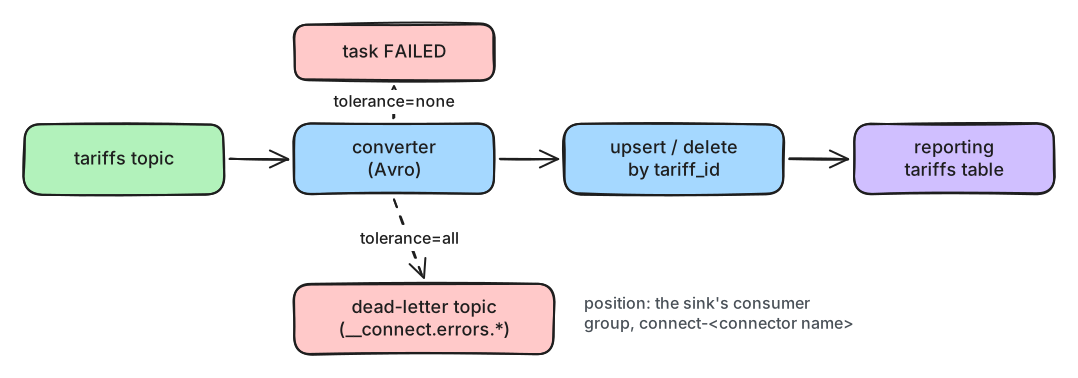
What to notice: by default, one bad record stops everything behind it. That's lesson 5.3's poison pill, inside Connect.
- With
errors.tolerance=none(the default), the task fails at the first bad record and stops. The connector still says RUNNING; only its task says FAILED. - With
errors.tolerance=all, records that fail in the converter or a transform are skipped. Adderrors.deadletterqueue.topic.nameand they're written to that dead-letter topic instead, with headers such as__connect.errors.exception.messagewhenerrors.deadletterqueue.context.headers.enable=true. Dead-letter topics exist for sink connectors only. - Errors while writing to the target are the connector's business. Some connectors report them to the dead-letter topic too; others retry and then fail the task.
errors.tolerance=all without a dead-letter topic drops bad records with nothing but a log line.
Don't use it that way.
Operating connectors
Connectors and tasks have states: RUNNING, PAUSED, STOPPED, FAILED and UNASSIGNED. The REST API does the rest:
GET /connectors?expand=statusshows every connector and its tasks.POST /connectors/<name>/restart?includeTasks=true&onlyFailed=truerestarts failed tasks. A FAILED task never restarts by itself.PUT .../pausekeeps the tasks but stops their work;PUT .../stop(Kafka 3.5+) shuts the tasks down and keeps the configuration and position;PUT .../resumestarts again from there.GET .../offsetsshows a connector's position, andDELETEorPATCHon it (Kafka 3.6+, while the connector is stopped) resets or moves it.
Command-line tools such as kcctl wrap the same API, and UIs like Kafbat UI can show connectors
too.
Deleting a connector doesn't delete its position. A new connector with the same name picks it up: that's handy for a configuration rebuild, and a trap after a fresh start. While building this lab, a re-created Debezium connector tried to continue from an old position in a log that no longer existed, and failed. Reset the offsets before you delete a connector you want to start over.
In production
- Alert on task states, not only connector states: a RUNNING connector can have FAILED tasks.
- Use
errors.tolerance=allonly together with a dead-letter topic and an alert on it. - Make every sink idempotent: upsert by a key, never plain inserts.
- Keep passwords out of connector configurations, which the REST API shows to anyone who can call
it. Use a config provider, for example
FileConfigProvideror a secrets manager. - Changes to a connector's configuration restart its tasks. Plan them like a deploy.
Practical
Note
Notebook: code/module-06/02-sinks-errors-and-dead-letters.ipynb
· Lab services: kafka-1..3, schema-registry, postgres, connect · Time: ~14 min
What you'll do: copy the tariffs into the reporting database with a JDBC sink, time a change end to end, stop the sink with a bad record, recover with a dead-letter topic, and operate both connectors through the REST API.
Step 1: The source: tariff changes from the pricing database
The notebook registers the same CDC connector as lesson 6.1, as m06l02-pricing-cdc:
source: RUNNING
Step 2: The sink: a JDBC connector into the reporting database
    "insert.mode": "upsert",                # insert a new key, update an existing one
    "delete.enabled": "true",               # a delete event deletes the row
    "primary.key.mode": "record_key",       # the record key (tariff_id) is the primary key
    "schema.evolution": "basic",            # create the table, add new columns
    "collection.name.format": "tariffs",    # the table's name
reporting columns: [('tariff_id', 'text'), ('site_id', 'text'), ('price_per_kwh', 'numeric'), ('idle_fee_per_min', 'numeric'), ('valid_from', 'date')]
rows: pricing 36 | reporting 36
Step 3: A price change, end to end
price visible in reporting after 0.1 s
rows: pricing 35 | reporting 35
Break it: a record the sink can't read
A quick script writes one tariff as plain JSON into the topic. Predict first: what does the sink do, and what happens to the next real price change?
connector: RUNNING | task: FAILED
Caused by: org.apache.kafka.connect.errors.DataException: Failed to deserialize data for topic m06l02_pricing.public.tariffs to Avro:
Caused by: org.apache.kafka.common.errors.SerializationException: Error deserializing schema ID
Caused by: java.lang.IllegalArgumentException: Unknown magic byte!
tar-site-N01-1 in reporting: 0.4900 (pricing has 0.5000)
Step 4: Tolerate bad records, park them in a dead-letter topic
    "errors.tolerance": "all",                                  # don't stop on a bad record ...
    "errors.deadletterqueue.topic.name": DLQ,                   # ... park it here
    "errors.deadletterqueue.topic.replication.factor": "3",
    "errors.deadletterqueue.context.headers.enable": "true",    # with headers saying why
lab.connect_api("POST", "/connectors/m06l02-reporting-tariffs/restart?includeTasks=true&onlyFailed=true")
tar-site-N01-1 in reporting: 0.5000
value: b'{"tariff_id": "tar-site-N01-1", "price_per_kwh": 0.39}'
__connect.errors.topic                     m06l02_pricing.public.tariffs
__connect.errors.partition                 0
__connect.errors.offset                    39
__connect.errors.connector.name            m06l02-reporting-tariffs
__connect.errors.task.id                   0
__connect.errors.stage                     KEY_CONVERTER
__connect.errors.class.name                io.confluent.connect.avro.AvroConverter
__connect.errors.exception.class.name      org.apache.kafka.connect.errors.DataException
__connect.errors.exception.message         Failed to deserialize data for topic m06l02_pricing.public.tariffs to
Step 5: Operate the connectors
m06l02-pricing-cdc         source  RUNNING  tasks: ['RUNNING']
m06l02-reporting-tariffs   sink    RUNNING  tasks: ['RUNNING']
GET /connectors/m06l02-pricing-cdc/offsets
{"lsn_proc": 157326720, "lsn_events_processed": 1, "messageType": "UPDATE", "lsn_commit": 157117496, "lsn": 157326720, "txId": 931, "ts_usec": 1791308569798030}
GET /connectors/m06l02-reporting-tariffs/offsets
{"partition": {"kafka_partition": 0, "kafka_topic": "m06l02_pricing.public.tariffs"}, "offset": {"kafka_offset": 41}}
Then the notebook stops the sink, changes a price, and resumes it:
PUT /connectors/m06l02-reporting-tariffs/stop
while stopped: 0.5000
PUT /connectors/m06l02-reporting-tariffs/resume
after resume: 0.4800
What just happened
The JDBC sink created the reporting table from the Avro schema and kept it equal to the pricing
table: a price change arrived within a tenth of a second, and the delete removed the row. Then the
plain JSON record reached the sink's converter, which found no magic byte. With the default
tolerance, the task failed and stopped there, and the next real price change waited behind it,
while the connector itself still said RUNNING. With errors.tolerance=all and a dead-letter topic,
the restarted task parked the bad record with headers naming the topic, partition, offset, stage and
error, and the waiting change went through. Finally, the offsets showed the two kinds of position: a
place in PostgreSQL's log for the source, a topic offset for the sink. Stop and resume kept the
sink's position, so the change made while it was stopped arrived as soon as it ran again.
Clean up
The last cell removes both connectors (resetting their offsets first), the slot and publication,
the topics, schemas and the reporting table, and resets the pricing database. If anything gets
stuck, docker compose down -v in the code/ folder resets the whole lab.
Key takeaways
- A sink connector is a consumer group (
connect-<name>) that writes records to a target system, at least once. - Make sinks idempotent: the JDBC sink's upsert by key turns replays into no-ops.
- By default one unreadable record fails the task; the connector still reports RUNNING.
errors.tolerance=allwith a dead-letter topic parks bad records with__connect.errors.*headers.- Operate connectors through the REST API: status, restart failed tasks, stop and resume, and read or reset offsets.
Next: Module 6 exercises