The production-readiness review
Everything this course taught ends up as a list of things that must be true before real traffic arrives. This lesson writes that list, turns it into a check a pipeline can run, reviews Brightlane's next release with it, and fixes what it finds. It closes with the patterns to reach for, the ones to avoid, and the ways to run Kafka.
Theory
Example: is it ready?
Brightlane's next release connects the first 1,500 motorway chargers. Everything worked in staging: the gateway wrote, billing charged, the dashboard was green. The CTO asks a different question: is it ready? Ready means it keeps working when a broker restarts, a service crashes or someone makes a mistake, and that someone notices when it doesn't. Working on a good day is not the test.
The team writes down what "ready" means, as a list, and checks the release against it.
The production checklist
Each line is something an earlier lesson showed failing:
| Area | Must be true | Lessons |
|---|---|---|
| Cluster | 3+ brokers; no automatic topic creation; new and internal topics get 3 replicas and need 2 in sync; no unclean leader elections | 1.2, 4.1 |
| Topics | every topic in a reviewed file; replication factor 3, min.insync.replicas 2; retention chosen for each; compaction where the latest value counts |
2.2, 4.1–4.3, 8.4 |
| Clients | producers acks=all with idempotence; consumers store an offset only after processing; transactional services read read_committed; idempotent processing by business key |
2.2, 3.2, 7.1 |
| Data | schemas with compatibility checks; a dead-letter path for bad records | 5.1–5.3 |
| Security | TLS and a login per service; deny by default; no wildcard ACLs; quotas for heavy clients | 8.1, 8.2 |
| Observability | alerts for broker down, offline and under-min-ISR partitions, controller count and consumer lag, each with a runbook | 8.3 |
| Operations | rolling restarts that wait for replication; topics as code; upgrade notes read | 8.4 |
| Recovery | a copy at another site; failover and failback runbooks, rehearsed | 9.1 |
| Tests | the four layers, in CI | 9.2 |
Turning the list into a check
A list in a wiki is read once. A readiness check is a program that verifies the list against the running system and the release's files, and exits with an error if anything fails. A CI pipeline then refuses to deploy a release that fails it, every time, without anyone remembering to look.
The course's readiness_check.py reads two files of the release: the topics (lesson 8.4's format)
and each service's client settings. It looks at the clusters through the Admin API and Prometheus's
API, and prints PASS, FAIL or SKIP per check, with the lesson that explains each failure.
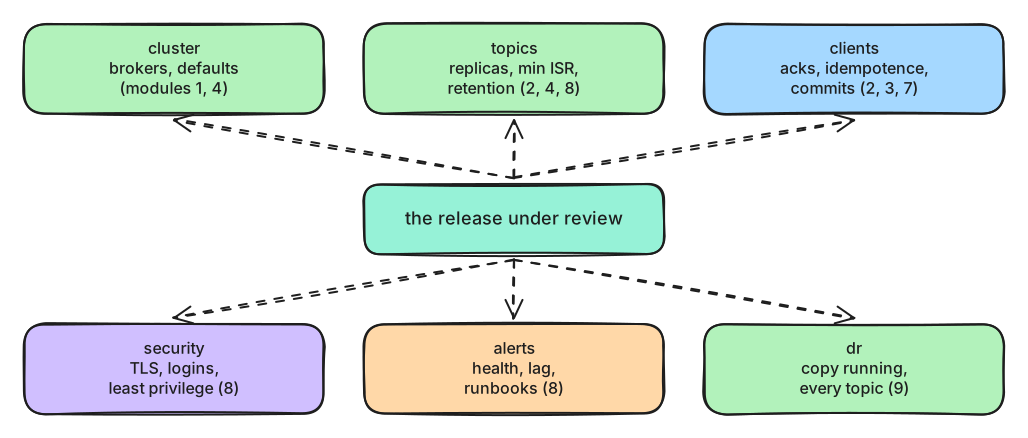
What to notice: every area is something a program can read. What it can't read stays for people.
Some of the list can't be automated: whether the runbooks were rehearsed, whether someone is on call, whether the cluster survives the peak load. A review meeting covers those, with the check's report on the table.
Patterns worth knowing
- Outbox. A service that must update its database and publish an event shouldn't write to both (a crash between the two leaves them disagreeing). It writes the event into an outbox table in the same database transaction, and change data capture (lesson 6.1) publishes it.
- Claim check. Large payloads, such as a charger's diagnostic dump or a firmware image, go to object storage; the event carries a link. Kafka's default maximum record size is about 1 MB, and big records slow every consumer of the partition.
- Idempotent consumer. Every consumer that changes something keys its effect on a business id, such as the session id, so a repeated record changes nothing (lessons 3.2 and 9.1). Retries, rebalances and failovers all repeat records.
Anti-patterns
- Request/reply over Kafka. A caller that waits for an answer through two topics gets the latency of both, correlation ids, and timeouts to handle, with none of Kafka's strengths. Use HTTP or gRPC for questions that need an answer now; use Kafka for facts others react to.
- Kafka as the database. Kafka can't answer "what is charger BL-N03-04's current status?" by itself: it reads in order, not by key. Build tables from topics (lesson 7.2) or keep a database, and use Kafka for the stream of changes.
- One cluster for everything at any cost, or a cluster per team: both hurt. Separate clusters where the failure domain, the security boundary or the region differs.
Ways to run Kafka
- On virtual machines or your own servers. Full control, and all the work: provisioning, upgrades, certificates, monitoring, capacity.
- On Kubernetes with Strimzi. An operator runs the cluster from resources (
Kafka,KafkaTopic,KafkaUser): rolling restarts that wait for replication, certificates, users and topics as code. You still need people who understand Kafka and Kubernetes. - Managed. Amazon MSK (Standard and Express brokers), Confluent Cloud, Aiven, Google Cloud's Managed Service for Apache Kafka. The provider runs brokers and upgrades; you keep topics, clients, security choices and costs. Azure Event Hubs speaks Kafka's protocol, but isn't Kafka: check the features you rely on.
- Kafka-compatible engines, such as Redpanda or WarpStream, implement Kafka's protocol with their own storage designs. The same checklist applies; check that the features you use, such as transactions or share groups, behave the same.
The costs that surprise people: data crossing availability zones (replication and consumers), storage for long retention, and the number of partitions, which managed services often bill.
What's coming
Kafka 4.4 is in its release-candidate phase in October 2026; read its upgrade notes before moving. Further out, diskless topics (KIP-1150, accepted as a direction in March 2026) would write topic data straight to object storage instead of broker disks, with no broker-to-broker replication. They trade latency for much lower storage and cross-zone costs. The details are still being designed, so none of it is in a release yet.
In production
- Run the readiness check in the release pipeline, and in a nightly job against production, where it catches drift.
- Don't forget the parts around the brokers. Kafka Connect's REST API has no login by default: anyone who reaches it can create a connector that reads your databases. Keep it on an internal network, behind TLS and authentication; the same goes for Schema Registry's API.
- Record accepted risks in writing, with an owner and a date: "the lab's controller listener is plain" is fine in a lab, and a finding anywhere else.
- Review the list itself once a year. Each incident adds a line.
Practical
Note
Script: code/module-09/readiness_check.py, with the release in code/module-09/release/
· Notebook: code/module-09/03-production-readiness-review.ipynb
· Lab services: kafka-1..3, kafka-secure, prometheus, kminion, grafana, kafka-dr, mirror-maker (the notebook starts them; together about 5 GB of the Docker VM's memory) · Time: ~16 min
What you'll do: put the release's topics and ACLs in place, run the check, fix each finding the way the course taught, and run it again until it's green.
Step 1: The first review
The setup creates the release's topics on the primary cluster, exactly as the file says, and the secure broker's ACLs as they are today. Then:
area      check                              result  detail
--------  ---------------------------------  ------  --------------------------------------------------------------------------------
cluster   3 or more brokers                  PASS    3 brokers
...
topics    billing.session-charges            FAIL    min.insync.replicas=1: one broker's disk is the only copy (lesson 2.2)
topics    charging.charger-status            FAIL    unclean.leader.election.enable=true: a stale replica may become leader (lesson 4.1)
clients   gateway                            FAIL    producer acks=1: a leader failure can lose writes (lesson 2.2); producer without idempotence: retries can duplicate (lesson 2.2)
clients   billing                            FAIL    reads read_uncommitted next to a transactional producer (lesson 7.1)
clients   grid                               FAIL    auto-commit stores offsets before processing: a crash skips records (lesson 3.2)
security  deny by default                    PASS    StandardAuthorizer
security  no wildcard ACLs                   FAIL    User:svc-grid ALL on TOPIC * (lesson 8.2)
...
alerts    partitions under min ISR           FAIL    no alert rule (lesson 8.3)
...
dr        MirrorMaker 2 is copying           PASS    last heartbeat 1 s ago
dr        every topic has a copy             PASS    4 topics copied to the dr cluster

readiness: 15 passed, 7 failed, 0 skipped
exit code 1: a CI pipeline would stop the release
Every failure came with a reason someone once found convincing. The release file says
min.insync.replicas: 1 # "billing must never stop writing during a broker restart".
Step 2: Fix the topics
The file first, then the cluster, as lesson 8.4's apply() does:
release_topics["topics"]["billing.session-charges"]["config"]["min.insync.replicas"] = 2
del release_topics["topics"]["charging.charger-status"]["config"]["unclean.leader.election.enable"]
Step 3: Fix the client settings
clients["services"]["gateway"]["producer"].update({"acks": "all", "enable.idempotence": True})
clients["services"]["billing"]["consumer"]["isolation.level"] = "read_committed"
clients["services"]["grid"]["consumer"]["enable.auto.offset.store"] = False
Step 4: Fix the ACLs
Grid reporting's wildcard is replaced by the three ACLs of exercise 8.1:
removed 1 ACL
added 3 ACLs
Step 5: Add the missing alert
rule = {"alert": "KafkaUnderMinIsrPartitions",
        "expr": "sum(kafka_server_replicamanager_underminisrpartitioncount) > 0",
Step 6: Review again
topics    billing.session-charges            PASS    6 partitions, 3 replicas, min ISR 2
topics    charging.charger-status            PASS    3 partitions, 3 replicas, min ISR 2
clients   gateway                            PASS    settings as in modules 2, 3 and 8
clients   billing                            PASS    settings as in modules 2, 3 and 8
clients   grid                               PASS    settings as in modules 2, 3 and 8
security  no wildcard ACLs                   PASS
alerts    partitions under min ISR           PASS    KafkaUnderMinIsrPartitions
...
readiness: 22 passed, 0 failed, 0 skipped
exit code 0: the release may go ahead
What just happened
The check read the release's files and the running lab, and each finding mapped to a lesson. Each reason was plausible, and each was wrong:
min.insync.replicas=1"so billing never stops writing" means a charge can be acknowledged while a single disk holds it.- Unclean elections "so the map is always available" can bring back a stale charger status.
acks=1"because it's faster" loses telemetry when a leader fails.read_uncommitted"for latency" shows billing records that a crash will roll back.- Grid's default auto-commit can skip a window's readings after a crash.
The wildcard ACL was lesson 8.2's incident waiting to happen again, and without an under-min-ISR alert the gateway could stop writing with nobody paged.
The fixes changed files first, then the cluster: the files are the record of what's intended, so the next deployment doesn't undo the fix. The second review passed all 22 checks and exited with code 0, the signal a pipeline uses to let the release through. In the break-it step, the same check caught a broker that didn't come back: run nightly, it finds drift as well as bad releases. What the check can't see is still yours to review: rehearsed runbooks, on-call, and a load test at the growth plan's peak.
Break it: a bad night
The check isn't only for releases. Run every night against production, it notices what changed since. Predict first: kafka-3 doesn't come back after maintenance. What does the review say?
area      check                              result  detail
--------  ---------------------------------  ------  ---------------------------------------------------
cluster   3 or more brokers                  FAIL    2 brokers
...
readiness: 21 passed, 1 failed, 0 skipped
exit code 1: a CI pipeline would stop the release
Clean up
The last cell removes the release's topics and their copies, the ACLs and the extra alert rule. This
is the course's last practical. To stop the lab:
docker compose --profile secure --profile monitoring --profile dr stop in the code/ folder; to
delete it with all its data, docker compose --profile secure --profile monitoring --profile dr --profile connect --profile schemas down -v.
Key takeaways
- "Ready" means it keeps working through failures and mistakes, and someone notices when it doesn't.
- Write the checklist down, then automate what a program can verify and run it in the release pipeline.
- Fix the source of truth first (the topic and client files), then the system, so the next deployment doesn't undo the fix.
- Reach for the outbox, claim check and idempotent consumer patterns; avoid request/reply over Kafka and Kafka as a database.
- Choose how to run Kafka (servers, Strimzi, managed) by who does the operations work, and watch cross-zone traffic, retention and partition costs.
Next: Module 9 exercises