Brokers, controllers and partitions
Lesson 1.1 treated Kafka as one box that stores event logs. It's really a small group of servers. This lesson names the parts, shows how one topic is spread over them, and explains how a client finds the right server, which is where many first outages come from.
Theory
Example: the gateway that couldn't start
At 06:00 last Tuesday, an engineer rebooted the server kafka-2 to install an operating-system
patch. At 06:01 the charger gateway was redeployed. It didn't start: it crashed, restarted and
crashed again for four minutes, until kafka-2 was back. Meanwhile 240 chargers kept their
meter readings in memory, about 9,600 of them.
Billing ran through the whole reboot without a single error. Both programs talk to the same Kafka cluster. The only difference was one line of configuration:
# gateway
bootstrap.servers=kafka-2:9092
# billing
bootstrap.servers=kafka-1:9092,kafka-2:9092,kafka-3:9092
To see why that line matters, you need the parts of a cluster.
Brokers and the cluster
A broker is a Kafka server process. It stores topic data on its disk and answers clients that write and read. Brokers that work together form a cluster. Production clusters have at least three brokers, so one can fail, or be patched like kafka-2, without losing data or stopping service.
Partitions and replicas
A topic is split into partitions. Each partition is its own ordered log with its own offsets
0, 1, 2… Splitting a topic lets several brokers share its traffic, and lets several consumers
read it in parallel (module 3). Brightlane's charging.telemetry has 6 partitions.
Each partition is stored on several brokers. Each copy is a replica, and the number of copies is the replication factor (3 at Brightlane, and in the lab). One replica is the leader: producers write to it and consumers read from it. The others are followers: they copy the leader's new records continuously. Followers that are fully caught up are in sync, and the list of them is the partition's ISR (in-sync replicas).
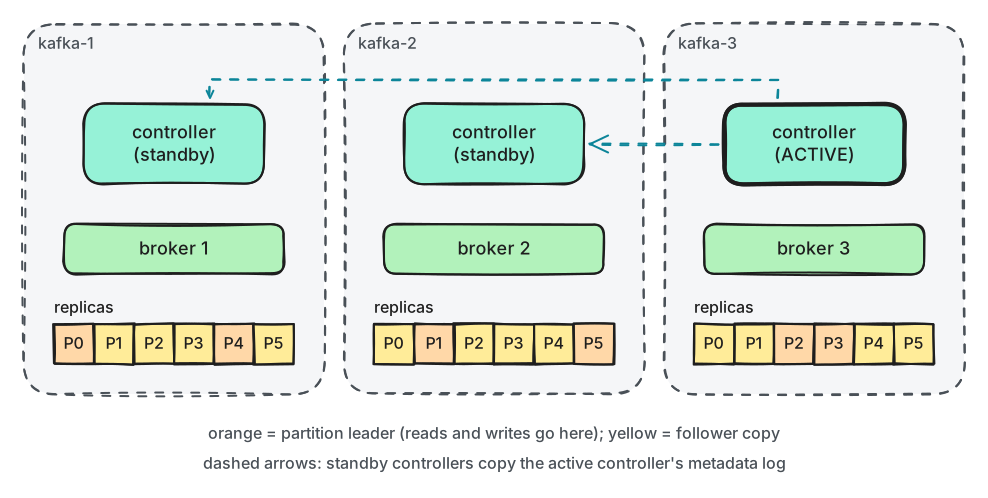
What to notice: every broker holds a copy of every partition here, but each one leads only two of them, so the work is shared.
If a leader's broker stops, an in-sync follower on another broker becomes the new leader within seconds. Lesson 4.1 looks at that hand-over in detail.
Controllers and KRaft
Somebody has to decide which broker leads which partition, notice when a broker disappears, and record which topics exist. That's the job of the controllers. Everything they decide is the cluster's metadata: the list of brokers, topics, partitions, leaders and settings.
Controllers keep the metadata in a log of their own and agree on it with KRaft, Kafka's built-in version of the Raft agreement protocol. Three (or five) controllers form a quorum. One of them is the active controller: it makes decisions and writes them to the metadata log. The others are standbys that copy that log, ready to take over. A change counts as decided once a majority has stored it: 2 out of 3. So three controllers survive one failure, and five survive two.
Until Kafka 3.x, this job was done by a separate system, Apache ZooKeeper. Kafka 4.0 removed ZooKeeper support completely. Any guide that tells you to start ZooKeeper is out of date.
In the lab, each node runs both a broker and a controller. This is combined mode. It saves memory on a laptop. In production, controllers run on their own small servers. Then a busy broker can't slow down the cluster's decisions, and you can add brokers without changing the quorum.
How a client finds the right broker
A client can't ask "Kafka" in general. It has to send records to the leader of each partition. It finds the leaders in two steps:
- It connects to one of the addresses in its bootstrap servers list and asks for the metadata. Any broker can answer.
- The answer lists every broker and the leader of every partition. From then on, the client talks to the leaders directly.
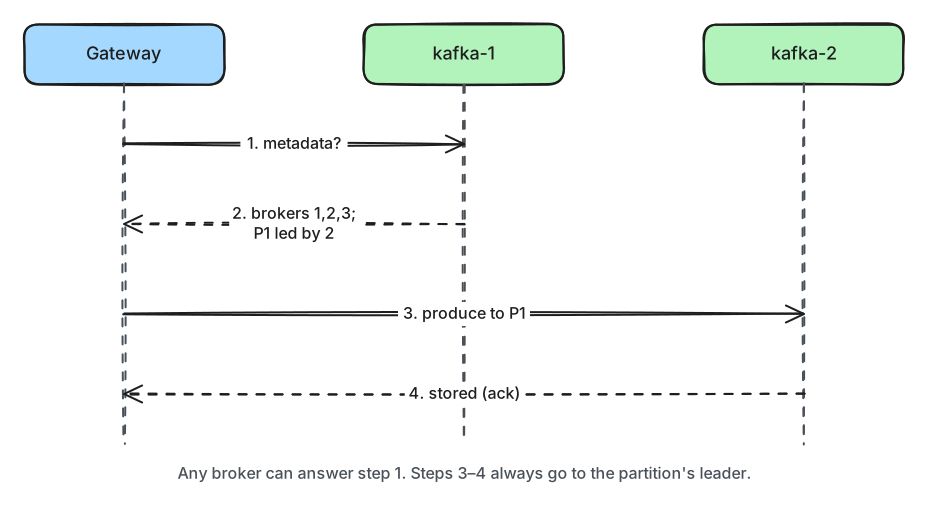
What to notice: the bootstrap list is only used to get started. If every address in it is down, the client never learns that other brokers exist. That's what happened to the gateway.
The addresses in the metadata answer are each broker's advertised listener: the address
the broker tells clients to use. They must be reachable from where the client runs. The lab
brokers have two listeners each: kafka-1:19092 for containers inside Docker, and
127.0.0.1:9092 for your Mac. If a broker advertised kafka-1:19092 to your Mac, step 1 would
work and step 2 would fail. That is the most common "Kafka in Docker" problem.
In production
- List at least three brokers in
bootstrap.servers, or one DNS name that resolves to several of them. Never a single broker. - Check
advertised.listenersfrom where the clients really run: another network, a Kubernetes cluster, a laptop on VPN. - Run 3 dedicated controllers (5 for large clusters) and at least 3 brokers, spread across racks or availability zones.
- Clients refresh their metadata when a leader moves. In the Python client,
metadata.recovery.strategy=rebootstrap(the default) also makes a client go back to its bootstrap list if all the brokers it knew have disappeared.
Practical
Note
Notebook: code/module-01/02-brokers-controllers-and-partitions.ipynb
· Lab services: kafka-1, kafka-2, kafka-3 · Time: ~17 min
What you'll do: look at the cluster as a client sees it and as an operator sees it, map a 6-partition topic onto the brokers, then stop kafka-2 and see which client survives.
Step 1: Ask the cluster who is in it
admin = AdminClient({"bootstrap.servers": settings.KAFKA_BOOTSTRAP})
cluster = admin.describe_cluster(request_timeout=10).result()

print("cluster id:", cluster.cluster_id)
cluster id: ZpMZEQqGS768XpROns7_Ug
broker  advertised address
------  ------------------
1       127.0.0.1:9092
2       127.0.0.1:9093
3       127.0.0.1:9094
These are the advertised addresses for your Mac.
Step 2: Find the active controller
The notebook runs Kafka's quorum tool inside the kafka-1 container (lab.kafka_cli prints each
command before running it):
print(lab.kafka_cli("kafka-metadata-quorum.sh", "--bootstrap-server", "localhost:19092",
                    "describe", "--replication"))
Output (shortened; the leader and the numbers vary):
kafka-1$ kafka-metadata-quorum.sh --bootstrap-server localhost:19092 describe --replication
NodeId  LogEndOffset  Lag  ...  Status
3       1167          0    ...  Leader
1       1167          0    ...  Follower
2       1167          0    ...  Follower
Node 3 is the active controller here. All three have the same LogEndOffset: the standbys have
copied the whole metadata log.
Step 3: Create a topic with 6 partitions and 3 replicas
admin.create_topics([NewTopic(TOPIC, num_partitions=6, replication_factor=3)])[TOPIC].result()
show_partitions() then calls admin.describe_topics() and prints one row per partition.
Output (which broker leads which partition varies):
partition  leader  replicas   isr
---------  ------  ---------  ---------
0          1       [1, 2, 3]  [1, 2, 3]
1          2       [2, 3, 1]  [2, 3, 1]
2          3       [3, 1, 2]  [3, 1, 2]
3          3       [3, 1, 2]  [3, 1, 2]
4          1       [1, 2, 3]  [1, 2, 3]
5          2       [2, 3, 1]  [2, 3, 1]
Step 4: Count the leaders per broker
{'broker 1': 2, 'broker 2': 2, 'broker 3': 2}
Each broker leads two of the six partitions.
Break it: a client that only knows one broker
Predict first: you stop kafka-2. Client A was configured with only 127.0.0.1:9093, which is
kafka-2. Client B has all three addresses. Which one can still start?
lab.compose("stop", "kafka-2")

for name, bootstrap in [("A", "127.0.0.1:9093"), ("B", settings.KAFKA_BOOTSTRAP)]:
    client = AdminClient({"bootstrap.servers": bootstrap, "logger": silent})
    try:
        brokers = sorted(client.list_topics(timeout=8).brokers)
        print(f"client {name}: connected, sees brokers {brokers}")
    except Exception as e:
        print(f"client {name}: failed to start: {e.args[0].str()}")
Output (you may also see a log line from the Step 1 client noting that kafka-2 disconnected):
$ docker compose stop kafka-2
client A: failed to start: Failed to get metadata: Local: Broker transport failure
client B: connected, sees brokers [1, 3]
Then the notebook shows the topic again:
partition  leader  replicas   isr
---------  ------  ---------  ------
0          1       [1, 2, 3]  [1, 3]
1          3       [2, 3, 1]  [3, 1]
2          3       [3, 1, 2]  [3, 1]
3          3       [3, 1, 2]  [3, 1]
4          1       [1, 2, 3]  [1, 3]
5          3       [2, 3, 1]  [3, 1]
What just happened
Step 1 showed the cluster as a client sees it: three brokers, each at its advertised address. Step 2 showed the controller quorum: one active controller, two standbys with a full copy of the metadata log. Steps 3 and 4 showed a topic split into partitions, each with a leader and two followers, and the leaders spread evenly. In the break-it step, client A failed exactly like the gateway: its only bootstrap address was down, so it never received the metadata that names the other brokers. Client B started through kafka-1 or kafka-3. The controllers noticed kafka-2 was gone and moved its two partition leaderships to the remaining brokers. Broker 2 also dropped out of every ISR list. The topic kept working with two copies of each partition.
Clean up
The last cell starts kafka-2 again (docker compose up -d --wait kafka-2) and deletes the
topic. Broker 2 rejoins the ISR lists within seconds. It takes back its leaderships a few minutes
later, when Kafka rebalances leaders automatically (lesson 4.1). If anything gets stuck,
docker compose down -v in the code/ folder resets the whole lab.
Key takeaways
- Brokers store partitions and serve clients; controllers decide and record the cluster's metadata.
- KRaft controllers form a quorum: 3 survive one failure, 5 survive two. ZooKeeper is gone since Kafka 4.0.
- Each partition has one leader and some followers; the in-sync ones form its ISR.
- Clients use
bootstrap.serversonly to fetch metadata. List several brokers. - Advertised listeners must be reachable from where the client runs.