Work queues with share groups
Consumer groups hand out whole partitions, which is right for ordered streams and wrong for a pile of independent jobs. Since Kafka 4.2, share groups hand out individual records instead, like a classic work queue. This lesson shows when that's the better fit, and what can go wrong.
Theory
Example: the tickets that waited
When a charger reports a fault, Brightlane opens a ticket in ops.fault-tickets. About 40 tickets
arrive per day, so the topic has just 2 partitions. Ten field technicians each run the ticket app
on a tablet.
With a consumer group, only two tablets ever received tickets: one partition each. The other eight technicians sat idle. Worse, a technician working a hard ticket for 25 minutes blocked every ticket behind it in that partition. The team considered giving the topic 10 partitions, then realised every new technician would mean more partitions, and a slow ticket would still block a queue.
Tickets don't need to be handled in order. Each is an independent job that one technician should take, finish, and confirm. That's a work queue.
Share groups
A share group is a group whose members share the records of a topic one by one, rather than each owning whole partitions. The broker still assigns partitions to members, but when there are more members than partitions, it gives each partition to several of them. With 10 technicians and 2 partitions, five share each partition. Each record of a partition goes to one of its members, whichever asks next. So members can outnumber partitions.
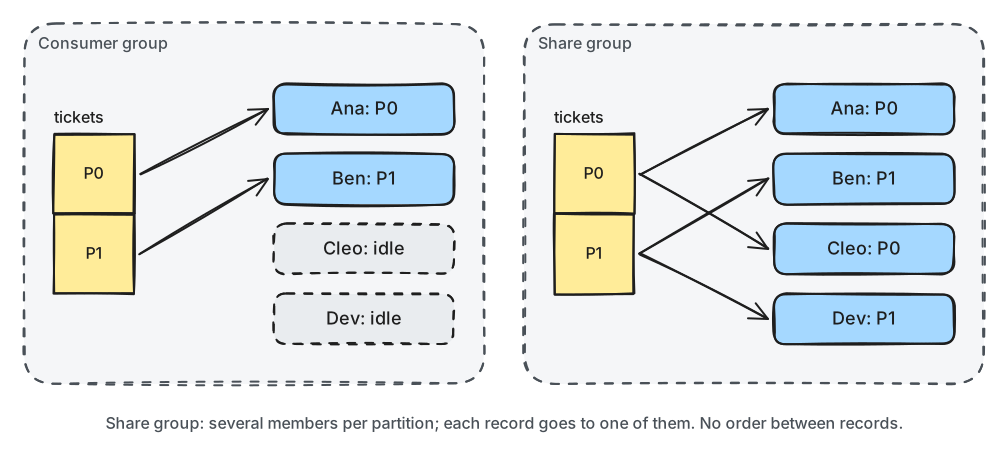
What to notice: in the share group nobody is idle, but a technician only gets tickets from their own partition, and nothing keeps two tickets in order.
Share groups were designed in KIP-932 ("Queues for Kafka") and are production-ready since Kafka 4.2.
On new clusters they are on by default (the share.version feature). The Python client offers
them as ShareConsumer, which is a preview in confluent-kafka 2.15: it works, but its interface
may still change.
Acquire, acknowledge, redeliver
When a member fetches a record, the broker marks it acquired by that member and starts a lock. The member then acknowledges it with one of three answers:
- ACCEPT: done. The record won't be delivered again.
- RELEASE: give it back. It becomes available to the partition's members again, possibly the same one.
- REJECT: it can't be processed at all. The record is archived: never delivered again.
The broker counts deliveries per record. A record that comes back too often (5 times by default,
share.delivery.count.limit) is archived, so a record that breaks every member can't circulate
forever.
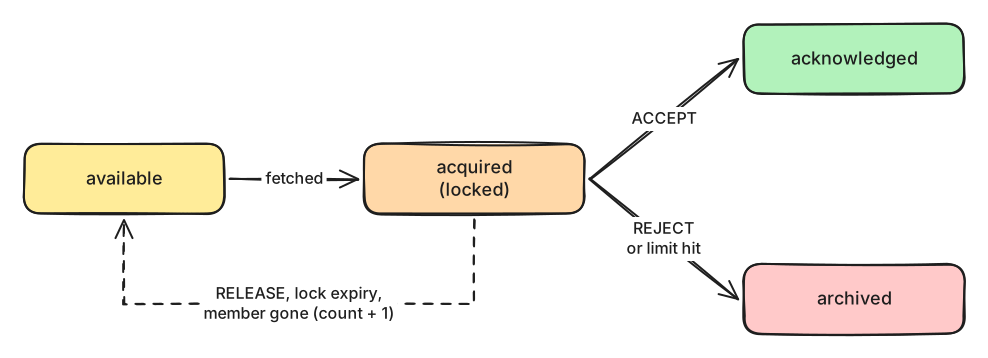
What to notice: three different events send a record back to "available": a release, an expired lock, and the member disappearing.
Three failure cases follow:
- If a member's process dies, the broker releases its records as soon as the connection drops.
But the dead member keeps its place in the partition assignment until its session times out
(
group.share.session.timeout.ms, 45 s by default). Until then, its partition's other members carry the load alone. - If a member is alive but slow, its lock (
share.record.lock.duration.ms, 30 s by default, 15 s at least) runs out, and the record goes to someone else while the first member is still working on it. Kafka 4.2 added a fourth acknowledgement, RENEW, that extends the lock (KIP-1222), but confluent-kafka 2.15 doesn't offer it yet. - If all of a partition's members are slow or gone, that partition's records wait, even while members of other partitions have nothing to do.
Share groups are configured on the broker, per group: the lock duration, the delivery limit, and
where a new group starts (share.auto.offset.reset, latest by default).
Consumer group or share group?
Use a consumer group when order per key matters, when processing keeps state per key, or when you need the highest throughput: almost all of modules 2–7. Use a share group when records are independent jobs, processing time varies a lot, you want more workers than partitions, or you want per-record retries.
In production
- Treat the Python
ShareConsumeras a preview: pin the client version and test upgrades. - Set the lock duration above your slowest normal job (the p99), and make jobs idempotent anyway: a lock can expire, and the job then runs twice.
- Run at least two members per partition, so one slow or dead member never leaves a partition alone. Which members share a partition is up to the broker, and it changes as members come and go.
- Use RELEASE for "try again", not for routing. A released record goes to whichever member of its partition asks next, which can be the same one. Send jobs that only a specialist can do to their own topic.
- Archived records just disappear. Before you REJECT a record, write it to a dead-letter topic of your own (lesson 5.3).
- Set
share.auto.offset.reset=earliestfor a new share group that must also see existing records. Watch each partition's backlog withkafka-share-groups.sh --describe.
Practical
Note
Script: code/module-03/technician.py (the notebook starts four copies)
· Notebook: code/module-03/04-work-queues-with-share-groups.ipynb
· Lab services: kafka-1, kafka-2, kafka-3 · Time: ~15 min
What you'll do: put 41 tickets on a 1-partition topic and let four technicians in a share group work through them. One technician's process is killed, one is too slow for the lock, and one ticket nobody can fix keeps bouncing.
Step 1: The tickets, and the share group's settings
The topic has a single partition, so all four technicians share it in every run. With more partitions, the broker would decide which technicians share which partition, and the results would differ from run to run.
Share group settings live on the broker. The notebook sets them with the same admin call you used
for topics, on a group resource:
group_config = ConfigResource("group", GROUP, incremental_configs=[
    ConfigEntry("share.auto.offset.reset", "earliest", incremental_operation=AlterConfigOpType.SET),
    ConfigEntry("share.record.lock.duration.ms", "15000", incremental_operation=AlterConfigOpType.SET)])
Then it writes 40 tickets one at a time, as they would arrive over a day, plus tkt-09999 with an
error code nobody knows:
41 tickets: {'E-OVERTEMP': 10, 'E-COMMS': 12, 'E-CABLE': 7, 'E-GFCI': 11, 'E-UNKNOWN': 1}
Step 2: Four technicians, one share group
The technician script fetches one ticket per poll and acknowledges explicitly:
    consumer = ShareConsumer({"bootstrap.servers": settings.KAFKA_BOOTSTRAP, "group.id": args.group,
                              "client.id": args.name, "share.acknowledgement.mode": "explicit",
                              "max.poll.records": args.max_records})
                    time.sleep(args.work_ms / 1000)                   # fixing the charger
                    consumer.acknowledge(msg, AcknowledgeType.ACCEPT)
Ana fixes a ticket in 0.3 s, Ben too but he can't fix cable faults (E-CABLE), Dev takes 2 s, and
Cleo 20 s. Nobody can fix E-UNKNOWN. After 6 seconds:
ana   has taken  3 tickets, fixed  2
ben   has taken  3 tickets, fixed  2
cleo  has taken  1 tickets, fixed  0
dev   has taken  1 tickets, fixed  0
All four have work from one partition. Each process also logs that the share consumer is in "Preview". The broker's view of the members (consumer ids shortened):
GROUP              CONSUMER-ID  HOST         CLIENT-ID  #PARTITIONS  ASSIGNMENT
m03l04-technicians GE7Xq8Rs...  /172.22.0.1  ben        1            m03l04-tickets:0
m03l04-technicians IwWCDq8X...  /172.22.0.1  dev        1            m03l04-tickets:0
m03l04-technicians JN6QnMUA...  /172.22.0.1  cleo       1            m03l04-tickets:0
m03l04-technicians aaVYFSIV...  /172.22.0.1  ana        1            m03l04-tickets:0
Step 3: A technician's tablet dies
Predict first: Dev's process is killed while he holds a ticket. What happens to the ticket?
dev holds: tkt-00401 E-OVERTEMP delivery=1 p0
['16:30:14.462 ana GOT tkt-00401 E-OVERTEMP delivery=2 p0']
Step 4: Let the others finish
technician  tickets taken  fixed  released
----------  -------------  -----  --------
ana         25             23     2
ben         24             17     7
cleo        1              1      0
dev         1              0      0
Break it: the slow technician and the bouncing ticket
The notebook lists every ticket handed out more than once (times vary):
16:30:13.837 ana GOT tkt-00412 E-CABLE delivery=2 p0
16:30:14.150 ana GOT tkt-00413 E-CABLE delivery=2 p0
16:30:14.462 ana GOT tkt-00401 E-OVERTEMP delivery=2 p0
16:30:16.960 ana GOT tkt-00428 E-CABLE delivery=2 p0
16:30:17.578 ana GOT tkt-00431 E-CABLE delivery=2 p0
16:30:19.464 ana GOT tkt-09999 E-UNKNOWN delivery=2 p0
16:30:19.978 ana GOT tkt-09999 E-UNKNOWN delivery=4 p0
16:30:19.833 ben GOT tkt-09999 E-UNKNOWN delivery=3 p0
16:30:20.346 ben GOT tkt-09999 E-UNKNOWN delivery=5 p0
16:30:27.291 ben GOT tkt-00404 E-GFCI delivery=2 p0
Cleo: ['16:30:12.281 cleo GOT tkt-00404 E-GFCI delivery=1 p0', '16:30:32.286 cleo DONE tkt-00404']
What just happened
Four technicians shared 41 tickets on a single partition; a consumer group would have kept three
of them idle. When Dev's process died holding tkt-00401, the broker released the ticket as soon as
his connection dropped, and Ana got it with delivery=2. Ben released the cable tickets he took,
and Ana, the next to ask, fixed them. tkt-09999 went back and forth between Ana and Ben. After its
fifth delivery the broker archived it: no technician will see it again, and nobody fixed it. Cleo
took tkt-00404 at 16:30:12. Her 15-second lock ran out at 16:30:27, while she was still working,
and the ticket went to Ben. She finished it at 16:30:32, so it was fixed twice.
Note
We first built this practical with 2 partitions, and the broker paired the technicians differently in every run. Once it put Cleo and Dev on the same partition. After Dev was killed, only Cleo, at 20 seconds a ticket, was left on it: 23 of its tickets were still waiting at the end, while Ana and Ben had long finished the other partition. In another run Ben shared a partition with Cleo, who was busy, so the cable tickets he released came straight back to him until the delivery limit archived them. That's why the production notes ask for at least two members per partition, and route specialist jobs to their own topic.
Clean up
The last cell deletes the topic and the share group. If anything gets stuck, docker compose down
-v in the code/ folder resets the whole lab.
Key takeaways
- Share groups hand out records, not whole partitions: several members share each partition, so members can outnumber partitions, but there is no order.
- Members acknowledge each record: ACCEPT, RELEASE (try again) or REJECT (archive).
- A dead member's records come back at once; a slow member's come back when the lock expires, and the job runs twice.
- After
share.delivery.count.limitdeliveries a record is archived, so park bad records yourself first. - Use share groups for independent jobs; keep consumer groups for ordered, keyed streams.
Next: Module 3 exercises